
One Clock for Every Log
Every intrusion I’ve worked ends up as the same question asked of six different logs: what happened around then? The proxy log says one thing, the event log another, the EDR console a third, and each one has its own idea of what a timestamp looks like. One is ISO with a Z, one is EvtxECmd’s seven decimal places with no zone at all, one is epoch milliseconds, and the email gateway’s export is in local time because of course it is. Lining them up by hand in a spreadsheet works right up until the moment it matters.
So I built Mill, a browser-based timeline that takes your logs as they are, finds the timestamps, and puts everything on one clock. You can try it right now at jon.glass/mill.
Goals
- Take the files you already have. CSV, TSV and other delimited text, JSON arrays, JSON Lines and Elasticsearch-style hits, straight out of the tool that made them.
- Find the time, then get out of the way. Mill works out which column holds the timestamp and how to read it. You only step in when it guesses wrong.
- One clock. Everything is merged in UTC, and you can flip the display to local time when you’re talking to someone in the building.
- Zoom to the burst. Incidents are a few minutes of noise in a day of quiet. The chart should take you there in one drag.
- Tell the story. Tag the events that matter and export the narrative, not just the rows.
- Keep it local. Like Spoke and Huddle, it’s a single static page. Nothing is uploaded.
Drop In the Logs
Add one file per log source. Mill reads the header, finds the column that looks like time, and parses whichever of these it finds: ISO 8601 with or without a zone, forensic-tool style like EvtxECmd and MFTECmd (2026-10-13 13:09:40.0000000), US month/day/year in 12- or 24-hour, written months like RFC 2822, Unix epoch in seconds, milliseconds, microseconds or nanoseconds, and Windows FILETIME.
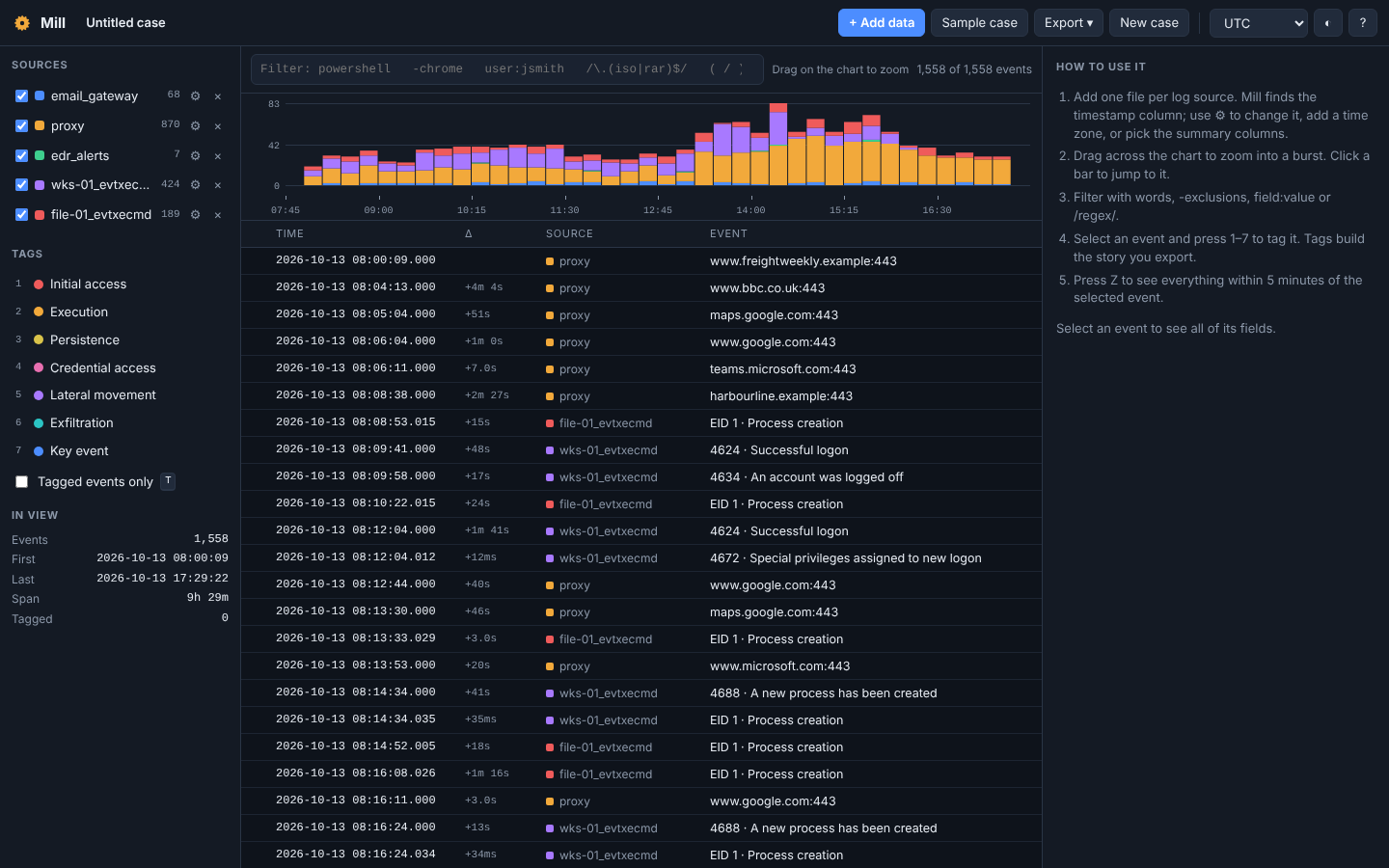 The whole day of Case 01: email gateway, proxy, EDR alerts and two hosts’ event logs, 1,558 events on one clock. The bump after 14:00 is the attacker.
When it guesses wrong, the ⚙ next to each source fixes it. Pick a different timestamp column, or more than one: give an MFT export both Created and Modified and you get one event per timestamp. Set the time zone for a source whose values carry none of their own (most forensic tools export UTC; email gateways often don’t). And choose which columns show up in the Event column, so a proxy line reads like something.
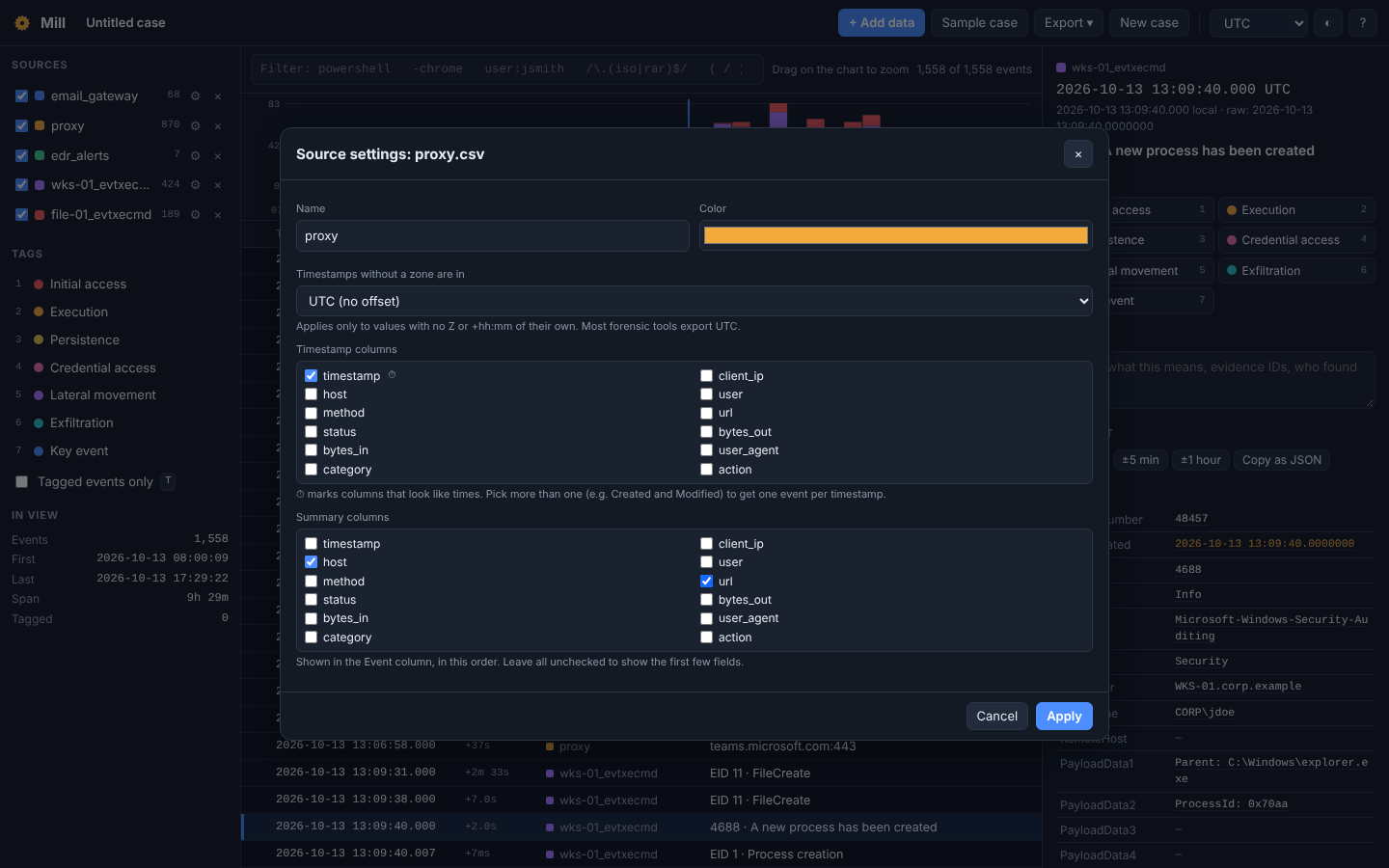 ⏱ marks the columns that look like times. Here the proxy’s Event column is set to show the host and the URL.
Zoom to the Burst
Drag across the chart to zoom into a burst, or click a bar to jump to it. Select any event and press Z to see everything within five minutes either side of it, from every source at once. That’s usually where the answer is.
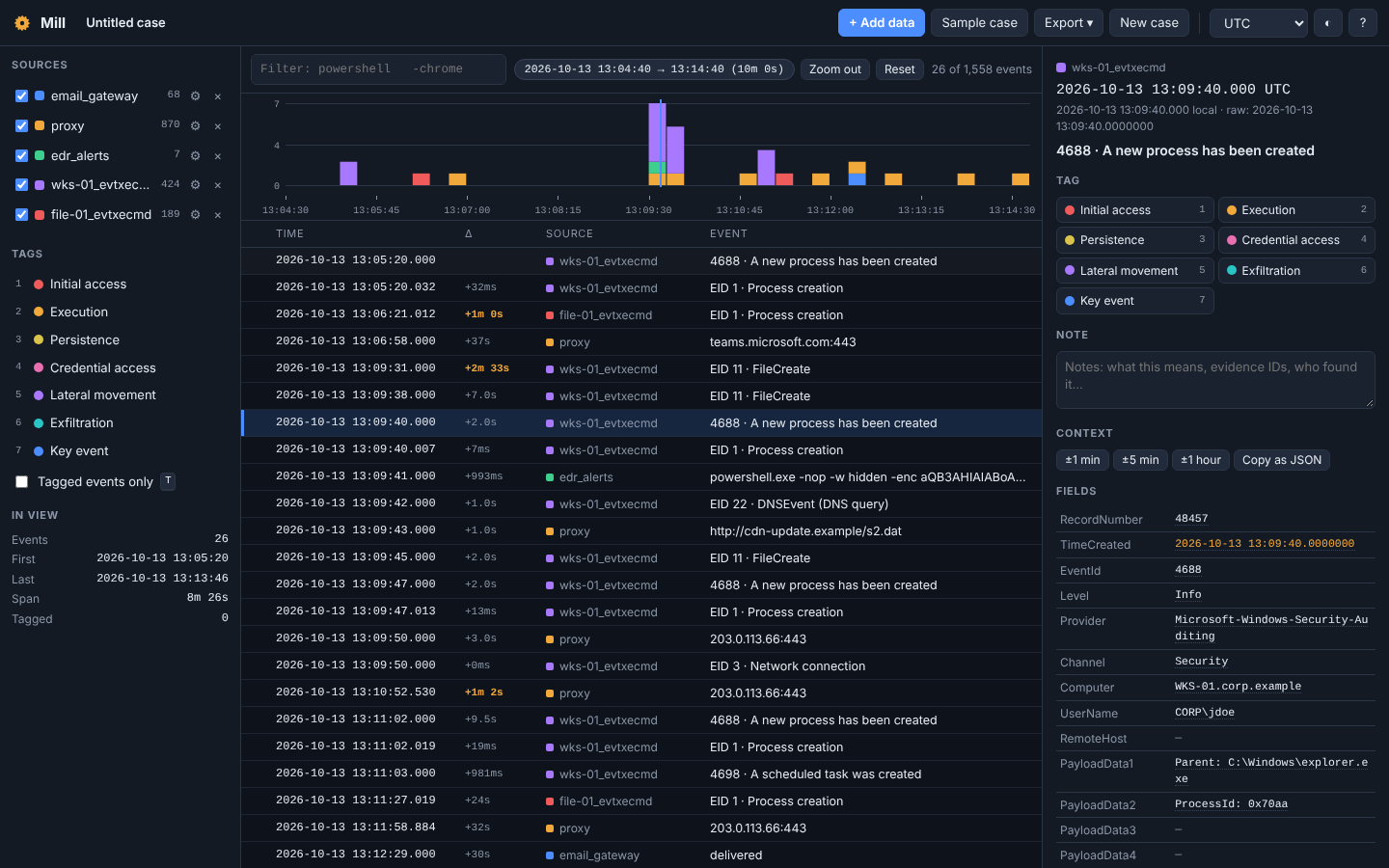 Ten minutes around 13:09:40. The .lnk’s PowerShell start (4688 and Sysmon 1), the EDR alert, the DNS lookup, the download in the proxy, the file write, the implant starting and its first beacon: ten seconds, four different logs.
The details panel shows every field of the selected event, with buttons to widen the window to ±1 minute, ±5 minutes or ±1 hour, and to copy the event as JSON. The Δ column shows the time since the previous event and highlights the gaps that are much longer than usual for this data, which is often where someone stopped to think.
Filter Like You Mean It
The filter box takes plain words (all must match), -exclusions, "exact phrases", /regular expressions/, and field:value for any column, plus src:, tag: and note: for Mill’s own fields.
 Filter
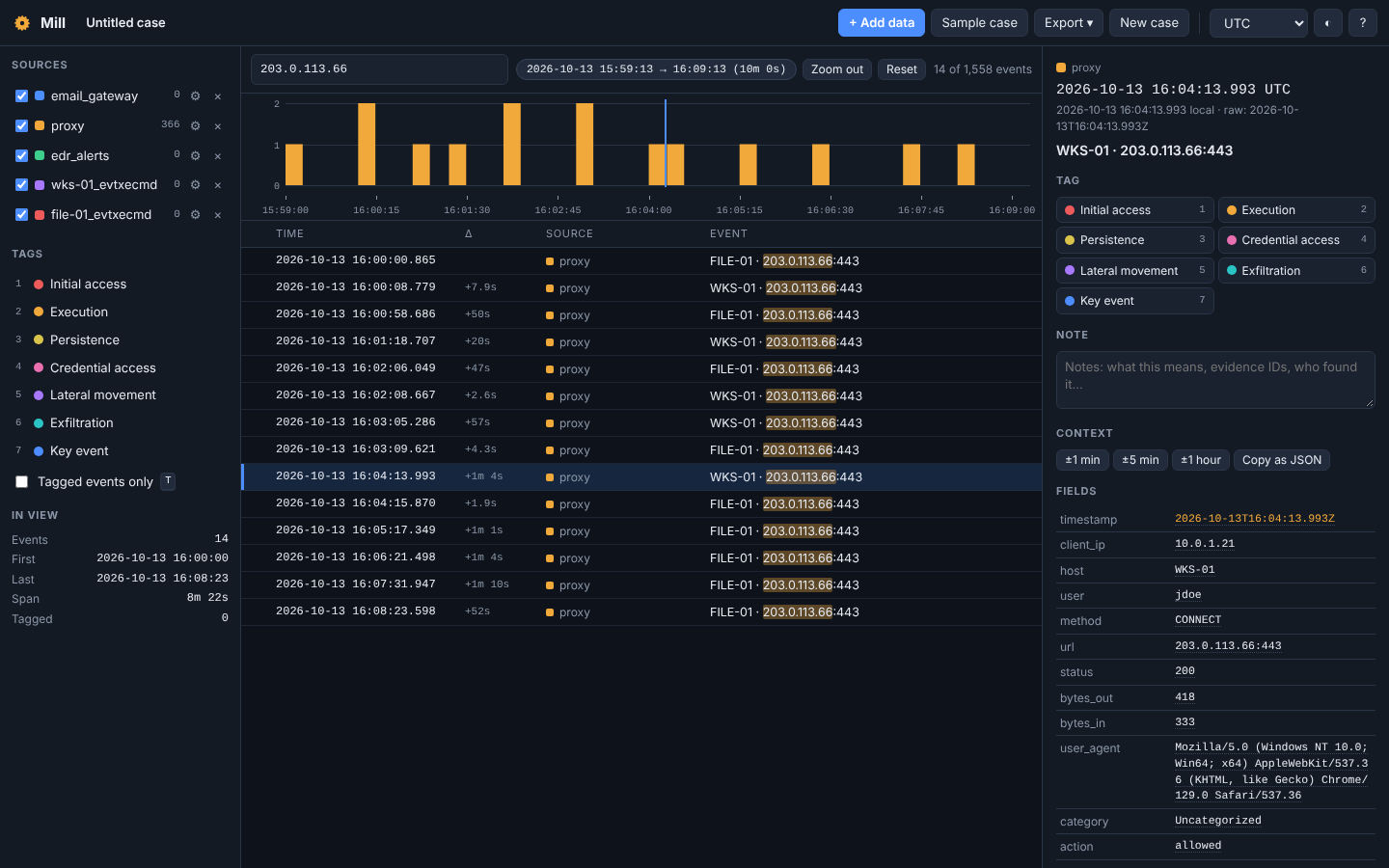
 203.0.113.66, zoomed around 16:05 when the SOC isolated WKS-01. Before it, two beacons a minute: WKS-01 and FILE-01. After it, only FILE-01. Isolating the first box didn’t contain anything.
That screenshot is my favorite thing Mill does. Nobody needs to explain why the incident isn’t over; the rows do it.
Tag the Story
Select an event and press 1 to 7 to tag it: Initial access, Execution, Persistence, Credential access, Lateral movement, Exfiltration, or Key event. Press N to write a note on it. Press T to show only what you’ve tagged.
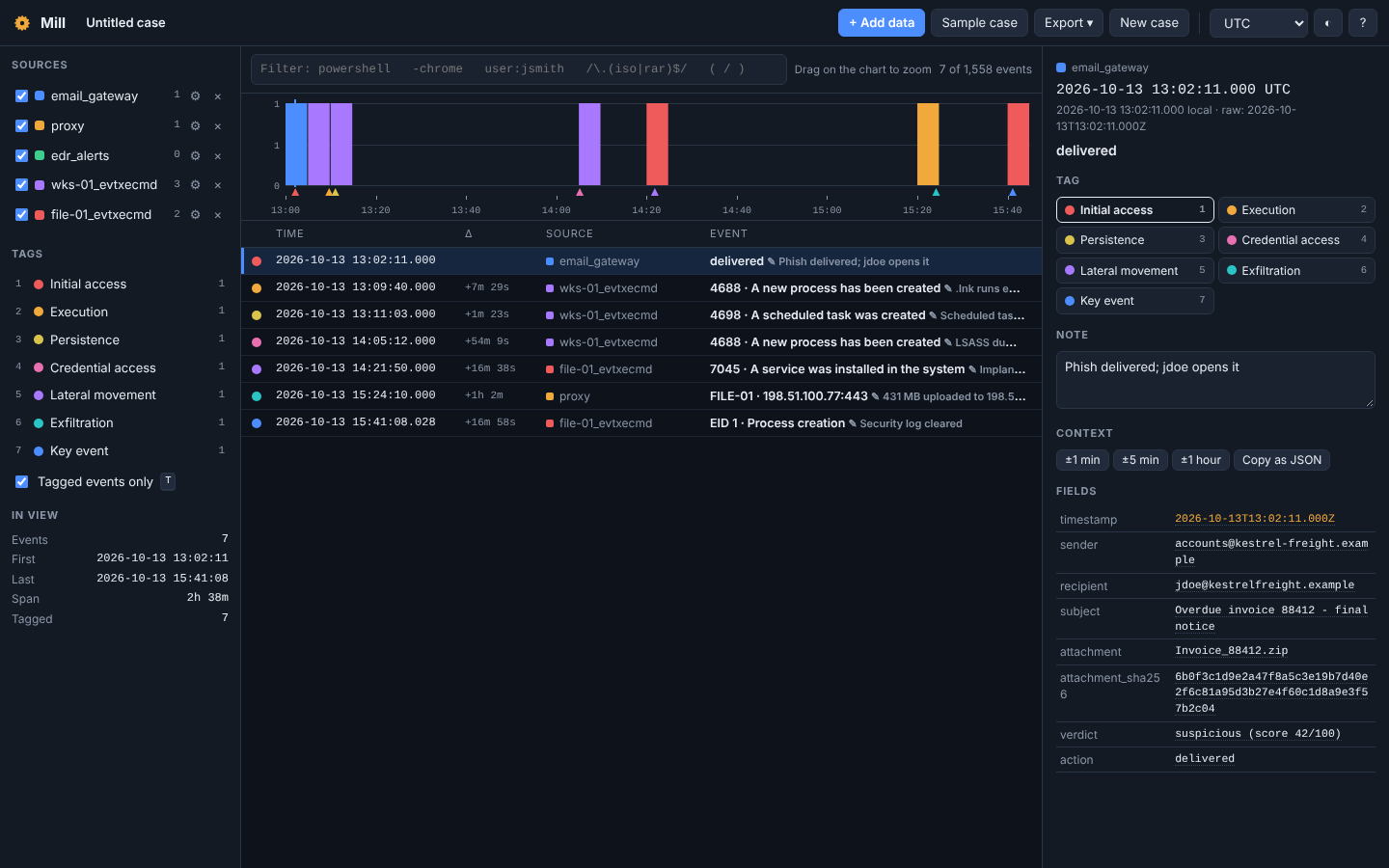 Seven tagged events out of 1,558: the intrusion from phish to log clearing in two and a half hours, each with a note.
Export → Story turns the tags into Markdown: a summary by tag with first times and the span, then the tagged timeline as a table with your notes. It’s the paragraph-and-table you were going to write anyway.
Plays Well with Others
Mill sits in the middle of the suite. Shifu recipes end in a Send to Mill block, Hexes sends bookmarked timestamps, and Tessera sends a case’s key events. Going the other way, Export opens the filtered events in Spoke as a graph or in CyberChef, and sends your tagged events to Tessera. All of it happens in the browser, between tabs.
You can also export the filtered or tagged events as CSV, or the whole case as a .mill.json file to pick up later: the log data itself, your settings, tags and notes, so it can get big. The case you’re working on is saved in your browser as you go.
Try It
Open Case 01’s logs in Mill, filter for s2.dat, select the download, and press Z. Then filter for 203.0.113.66 and find the moment the beacons change. Or click Sample case for Mill’s own example, then drop in the exports from your last incident.
If there’s a timestamp format Mill doesn’t read, send me a line of it and I’ll teach it.