
Keeping the Whole Case in One Place
Three hours into an incident, the case is everywhere. The timeline is in one tool, the process tree in another, the hashes are in a terminal you closed, the indicators are in a chat thread, and the most important decision of the day (“finance wants the file server to stay up”) lives only in someone’s memory. Then the manager asks the three questions every incident comes down to: what happened, how far did it go, and is it contained? Answering means going back through all of it.
The tools I’ve been building each answer part of that. Mill builds the timeline, Spoke shows the relationships, Shifu cleans up the logs, Hexes takes the files apart, and Scrimmage and Huddle handle the containment and the playbook. What none of them did was hold the case.
So I built Tessera, a case notebook for one incident. A tessera is a single tile in a mosaic: each tool produces tiles, and this is where they become a picture. (It’s also glass, which on a site called jon.glass was too good to pass up.) You can try it right now at jon.glass/tessera.
Goals
- Hold the case, not the data. Mill keeps the full timeline and Hexes keeps the file. Tessera keeps what you concluded from them: the findings, the key events, the indicators, what’s in scope, the evidence and its hashes, and every decision.
- Say how sure you are. Every finding is confirmed, likely or possible, because “we think” and “we know” belong in different sentences of the report.
- Take from the other tools. Mill and Hexes send straight into the open case, and anything you paste gets its indicators pulled out.
- End with the report. The case writes the report as you go, so the write-up is never a separate job at the end.
- Keep it local. Like the rest of the suite, it’s a single static page. No server, no account, nothing uploaded. The case file is how you keep it or share it.
The Overview
A case opens on its overview: status, severity, who’s leading, and a summary of what happened in a few sentences. Below that are the counts, the scope board grouped by status, and the latest events.
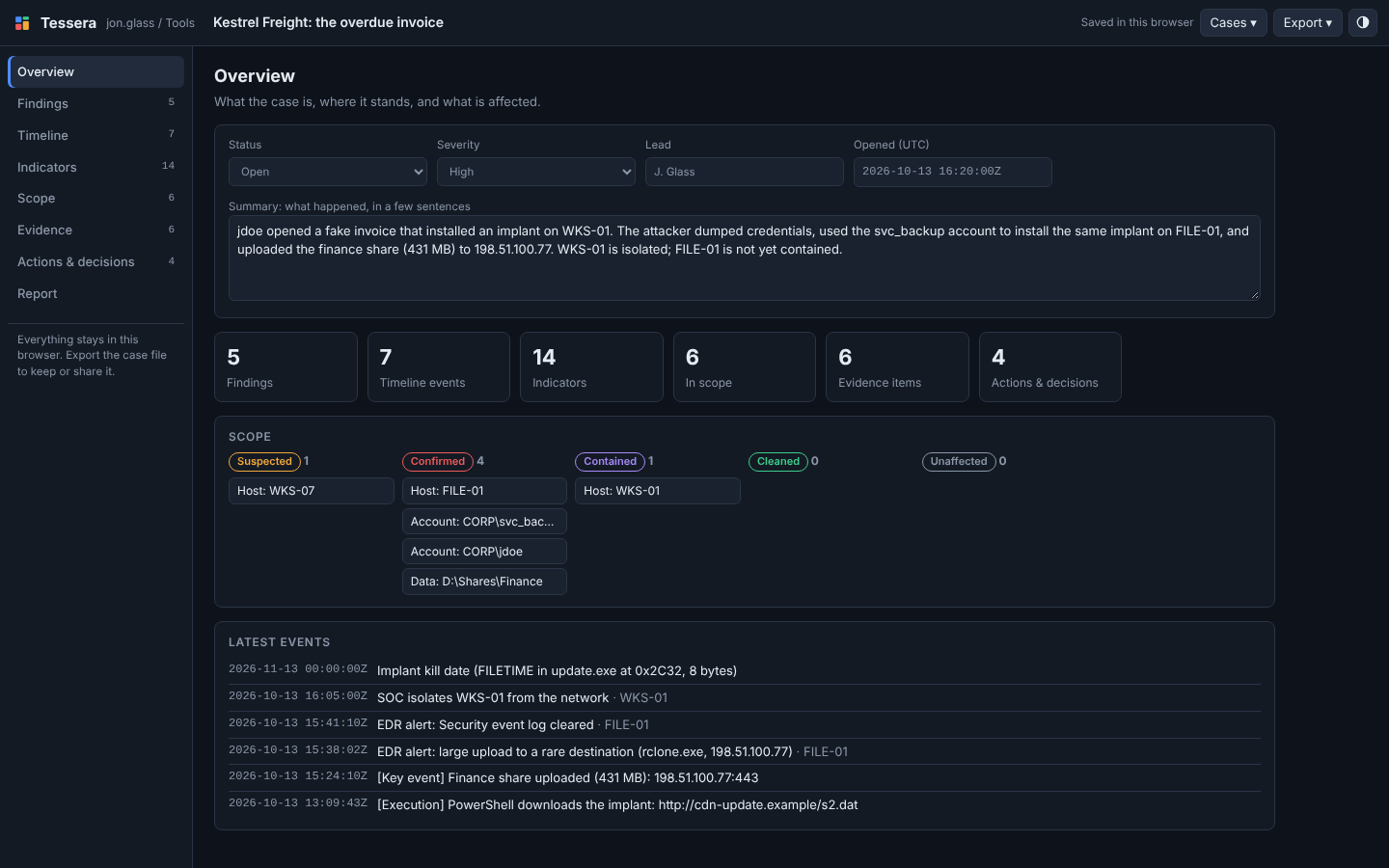 The Case 01 investigation a couple of hours in. Four things confirmed in scope, one contained, one still suspected. The scope board answers “how far did it go?” at a glance.
The scope board is the part I find myself looking at most. Every host, account and dataset gets a status: suspected, confirmed, contained, cleaned or unaffected. “Is it contained?” stops being a feeling and becomes a column you can read. In the case above, the answer is no: FILE-01 is confirmed and nowhere near the contained column.
Sending Tiles In
The other tools hand their findings over in one click, through the same browser-local hand-off Shifu already uses to send results to Mill.
- In Mill, tag the events that matter, then Export → Send to → Tessera. Each one arrives with its tag and your note.
- In Hexes, Add to case sends the open file as an evidence item with its MD5, SHA-256 and size. Send to Tessera in the Bookmarks tab sends the file plus your bookmarks: timestamped ones become timeline events, the rest become findings.
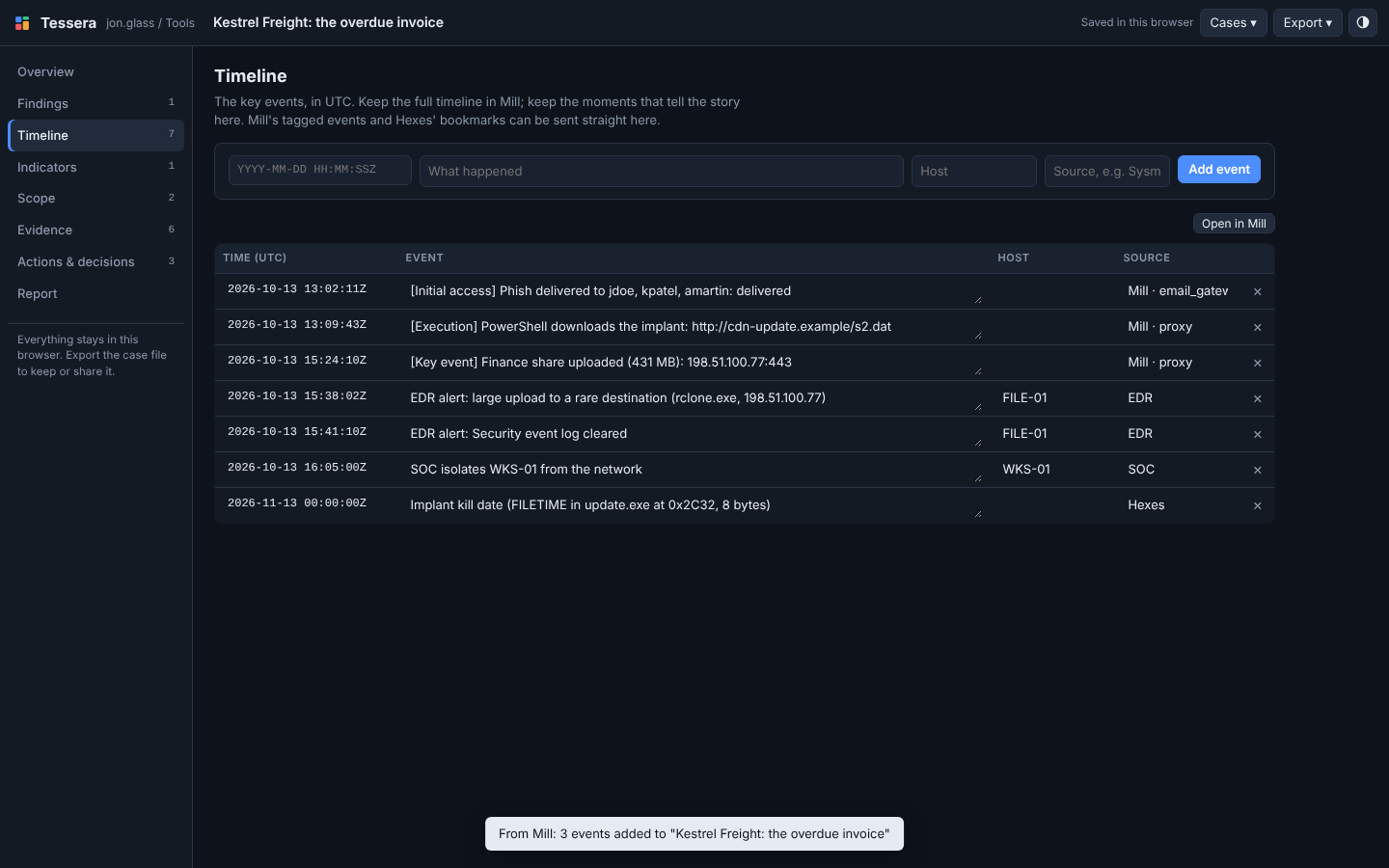 Three tagged events from Mill, alerts and the SOC’s response from the case file, and the implant’s kill date bookmarked in Hexes. Duplicates are skipped, so sending the same thing twice is harmless.
Pasting Indicators
Indicators show up everywhere: in alerts, in vendor reports, in a colleague’s message with the dots wrapped in brackets. Paste any of that into the Indicators section and Tessera pulls them out: IPs, domains, URLs, hashes, email addresses, file paths, registry keys, named pipes and mutexes.
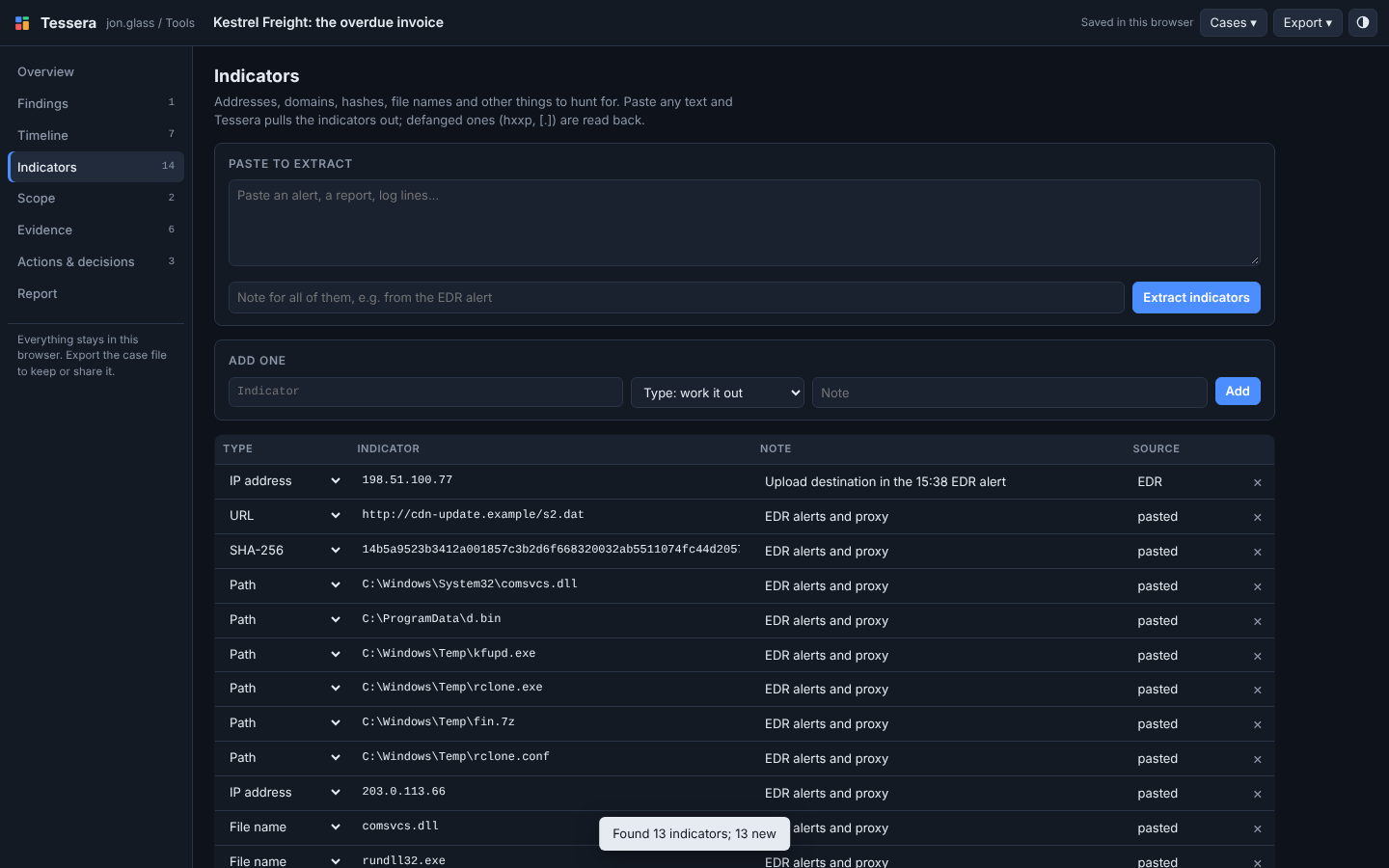 Three EDR alerts and a line of defanged proxy notes, pasted in. Thirteen indicators came out, typed and deduplicated.
It reads defanged text back (hxxp, [.]), and it knows update.exe is a file name, not a domain with a funny ending. It also refuses things that only look like indicators: 999.1.2.3 isn’t an IP, and neither is a version number like 5.1.19041.4648.
Going the other way, the indicators export as CSV, as a defanged list that’s safe to paste into email, or as a YARA rule: text indicators become strings matched in ASCII or UTF-16, and hashes go through the hash module. Paste the rule into Hexes’ YARA tab to test it against the sample before you rely on it.
Decisions Have Threads
The record you get asked for after an incident is rarely “what did the logs say.” It’s “who decided that, and did anyone object?” Actions & decisions keeps that record: what was done or decided, by whom, and when. Each item has its own thread of notes for the objections, the follow-ups and the things that changed.
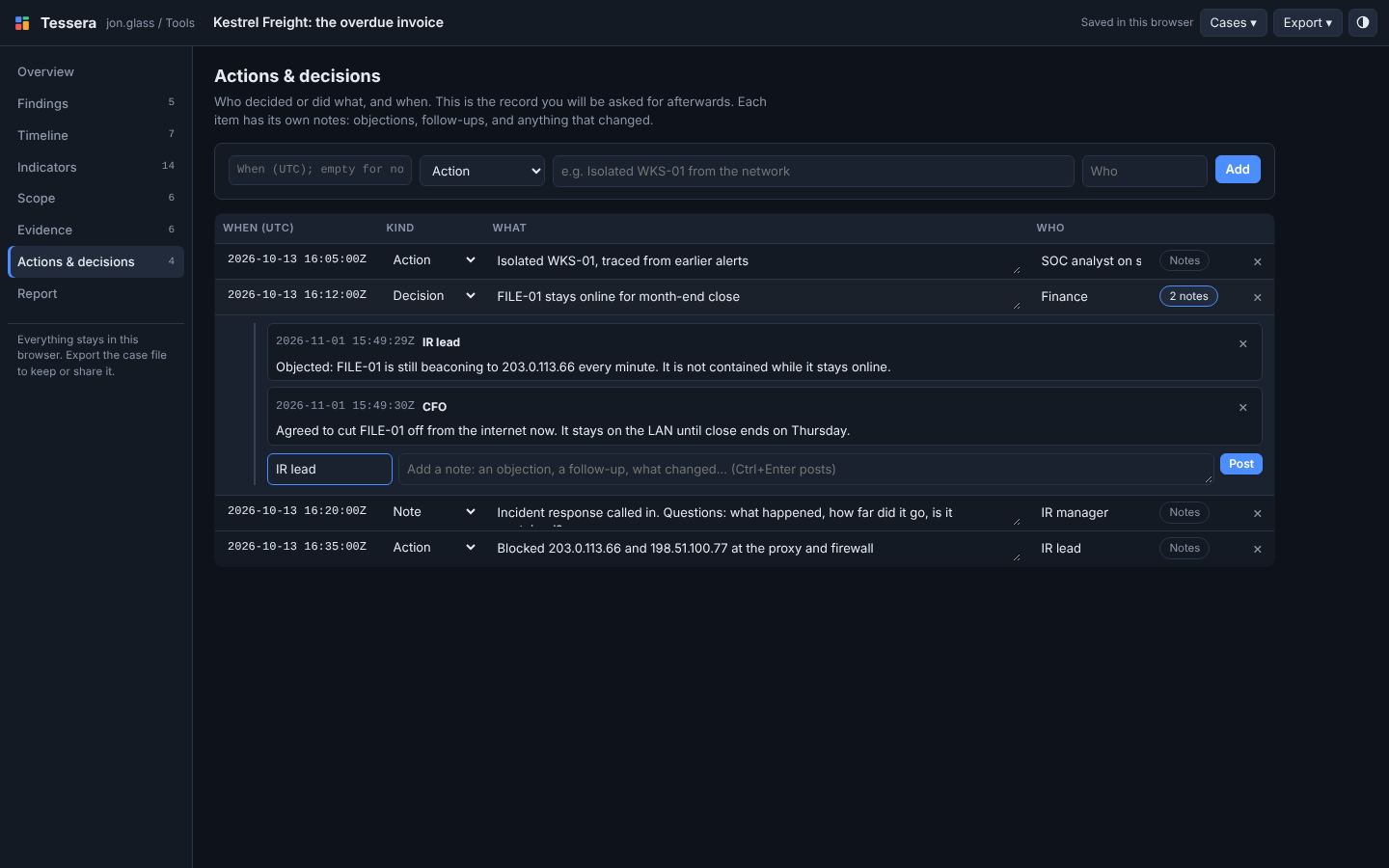 Finance decided FILE-01 stays online for month-end. The thread under it holds the objection and the compromise, so the reasoning travels with the decision.
The Report
The report is built from the case as it stands: summary, scope, timeline, findings grouped by confidence, defanged indicators, the evidence register, and the decisions with their threads. Export it as Markdown or print it (or save it as a PDF).
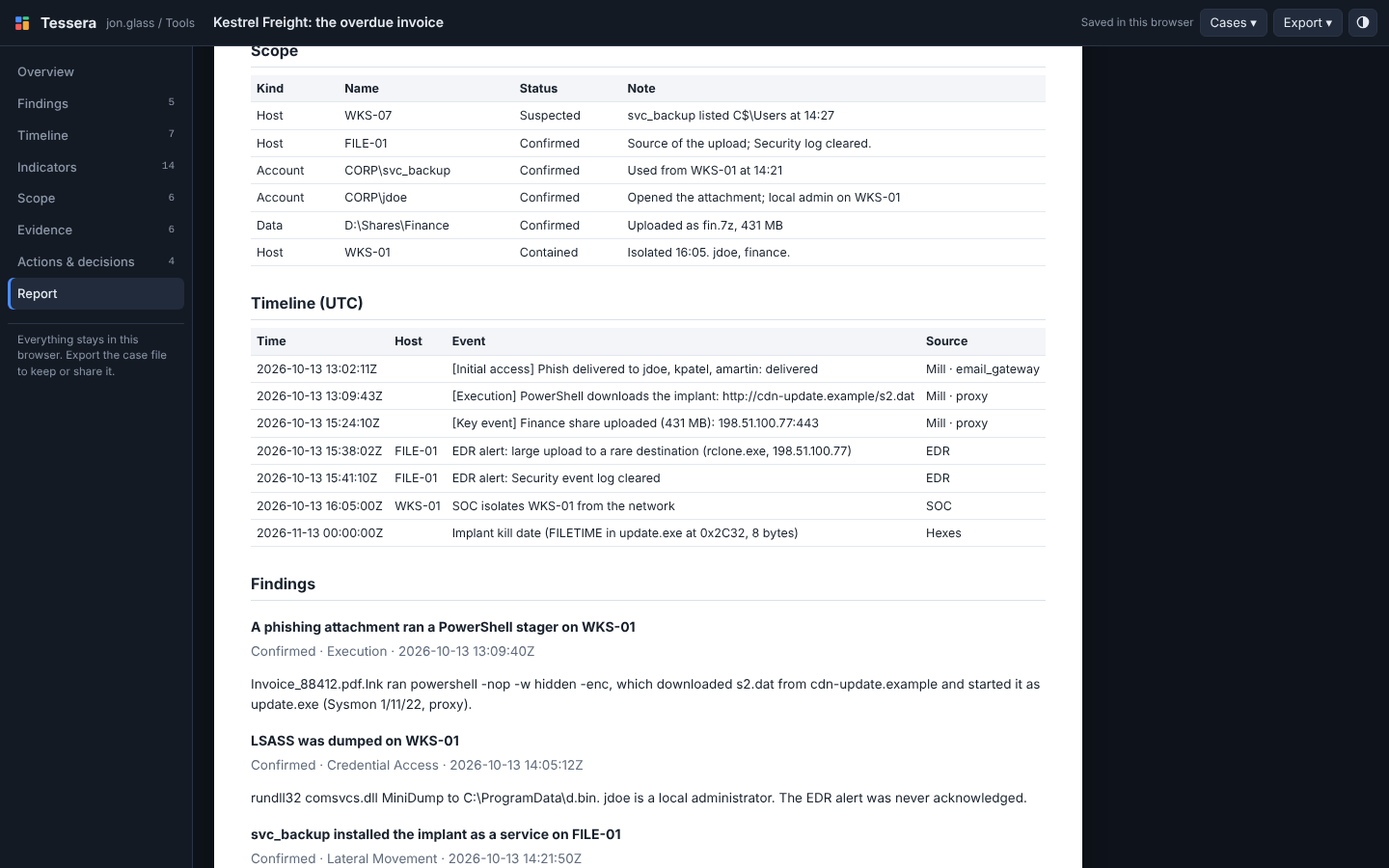 The same case as a report. Nothing here was written twice: it’s the scope board, the timeline and the findings, laid out for someone who wasn’t there.
Where the Case Lives
Everything stays in your browser, like the rest of the suite. That’s a feature for evidence handling, but browser storage gets cleared, so the real unit is the case file: export it to keep it, share it, or hand it in. Opening a case file you already have never overwrites your copy.
There are a few things Tessera deliberately doesn’t do: logins, multi-user editing, ticket queues and SLAs. Those turn a weekend tool into a product, and real SOCs already have platforms for them. Tessera is the notebook you keep while you work, and the report you hand over when you’re done.
For Teaching
This is the piece that turned the tools into something I can teach with. Case 01: The overdue invoice is a practice intrusion that runs through all seven tools. It starts with a Tessera case file holding what’s known when you’re called in. Students work the evidence, send their findings in, and finish by exporting the report: their answer to the manager’s three questions. They hand in the case file; the instructor opens it and grades the report.
Try It
Open Case 01 in Tessera and look at what’s known at 16:20. Then open the case’s implant in Hexes, bookmark something interesting, and send it over. Paste an alert into Indicators and see what comes out.
If there’s a section you keep wishing for, or a tool you want sending into it, let me know.