
A Hex Viewer That Knows It's Holding Evidence
Most hex editors are built for programmers patching binaries. In DFIR, the file in front of you is usually evidence, and the jobs are different: prove it’s the file you think it is, read the timestamps buried in it, pull out the strings and the hidden config, find the other file tucked inside it, and write down what you did so someone else can repeat it. Doing that in a general-purpose hex editor means a calculator for FILETIMEs, a separate strings tool, CyberChef in another tab, and a text file of notes you hope you kept up to date.
So I built Hexes, a hex viewer for evidence that runs in your browser. It’s read-only until you say otherwise, it hashes the file as it opens, and it knows what an analyst wants to do with the bytes. You can try it right now at jon.glass/hexes.
Goals
- Sealed by default. The file opens read-only. If you do need to edit, you unseal it on purpose, your changes stay in memory, and the original is never touched.
- Hash first. MD5 and SHA-256 are computed as the file opens, so the first thing you see is how to prove which file this is.
- Decode, don’t calculate. Whatever you click is read as integers, floats, timestamps, addresses and GUIDs, in both byte orders.
- Everything the next step needs. Strings, decoding, embedded files, YARA and comparison are tabs in the same window, not other tools.
- Write it down for me. A session log records every open, carve, export, compare and scan, with hashes.
- Keep it local. Like the rest of the suite, nothing is uploaded. Multi-gigabyte disk images open instantly, because Hexes only reads the parts you look at.
Open It
Choose a file or drop it on the page. Hexes names it from its magic bytes (about sixty file types, from PE and ELF to registry hives, event logs, pcaps and disk images) and starts hashing.
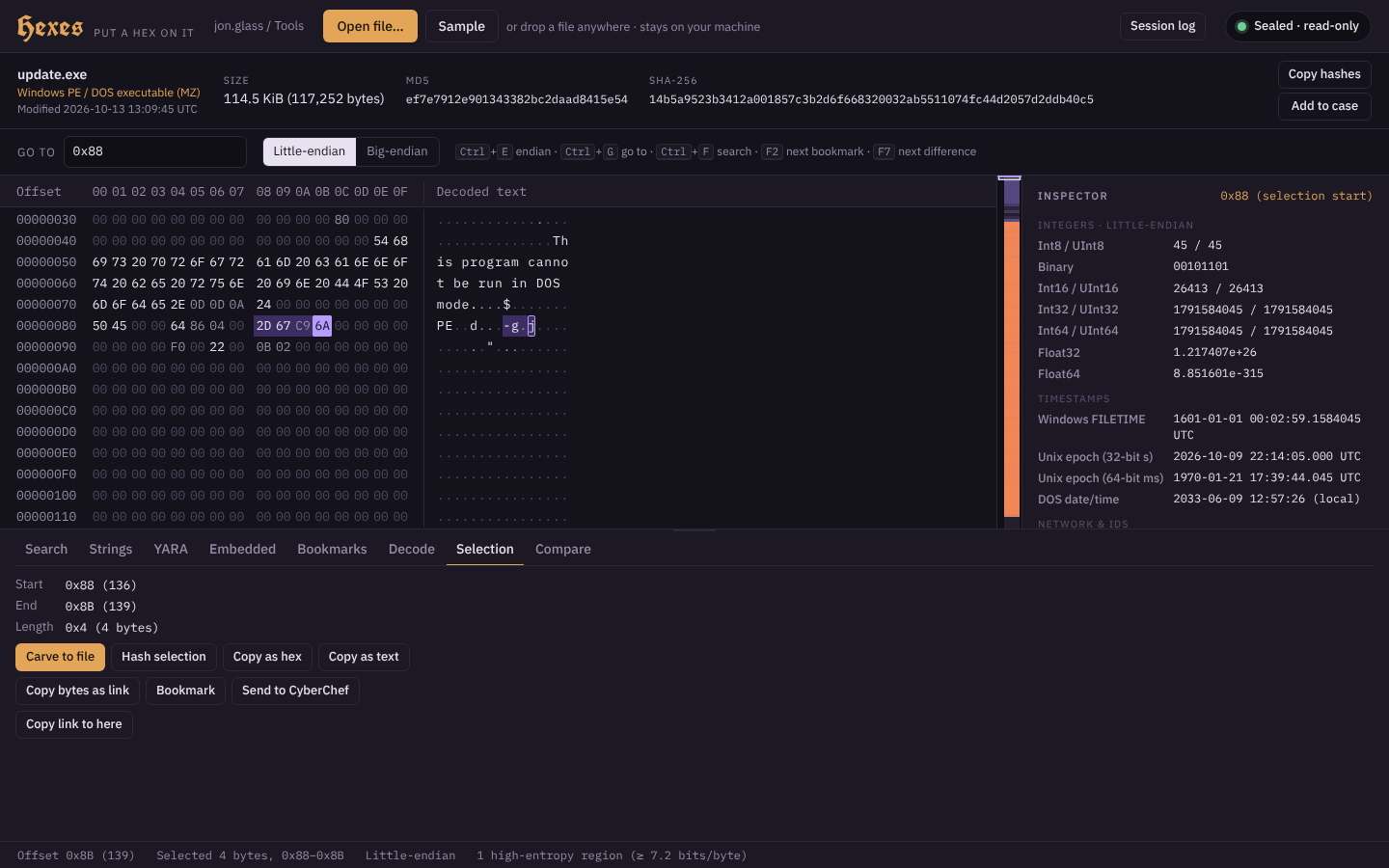 The implant from Case 01, with the four bytes of the PE header’s TimeDateStamp selected. The inspector reads them as a Unix time: built 2026-10-09 22:14:05 UTC, four days before the phishing email.
The inspector on the right is the part I use most. Click any byte and it shows what the bytes from there would mean as 8-, 16-, 32- and 64-bit integers, floats, a Windows FILETIME, Unix seconds and milliseconds, a DOS date and time, an IPv4 or IPv6 address, a GUID, and ASCII or UTF-16 text. Ctrl+E flips the byte order.
The strip down the right edge of the grid is an entropy map of the whole file: packed or encrypted regions glow orange, and the status bar counts them. Click anywhere on it to jump there.
Strings
The Strings tab finds readable ASCII and UTF-16LE text in one pass over the file, the same results as strings -a and strings -el. Filter the list with text or a regular expression, click one to select its bytes, and save the lot as CSV.
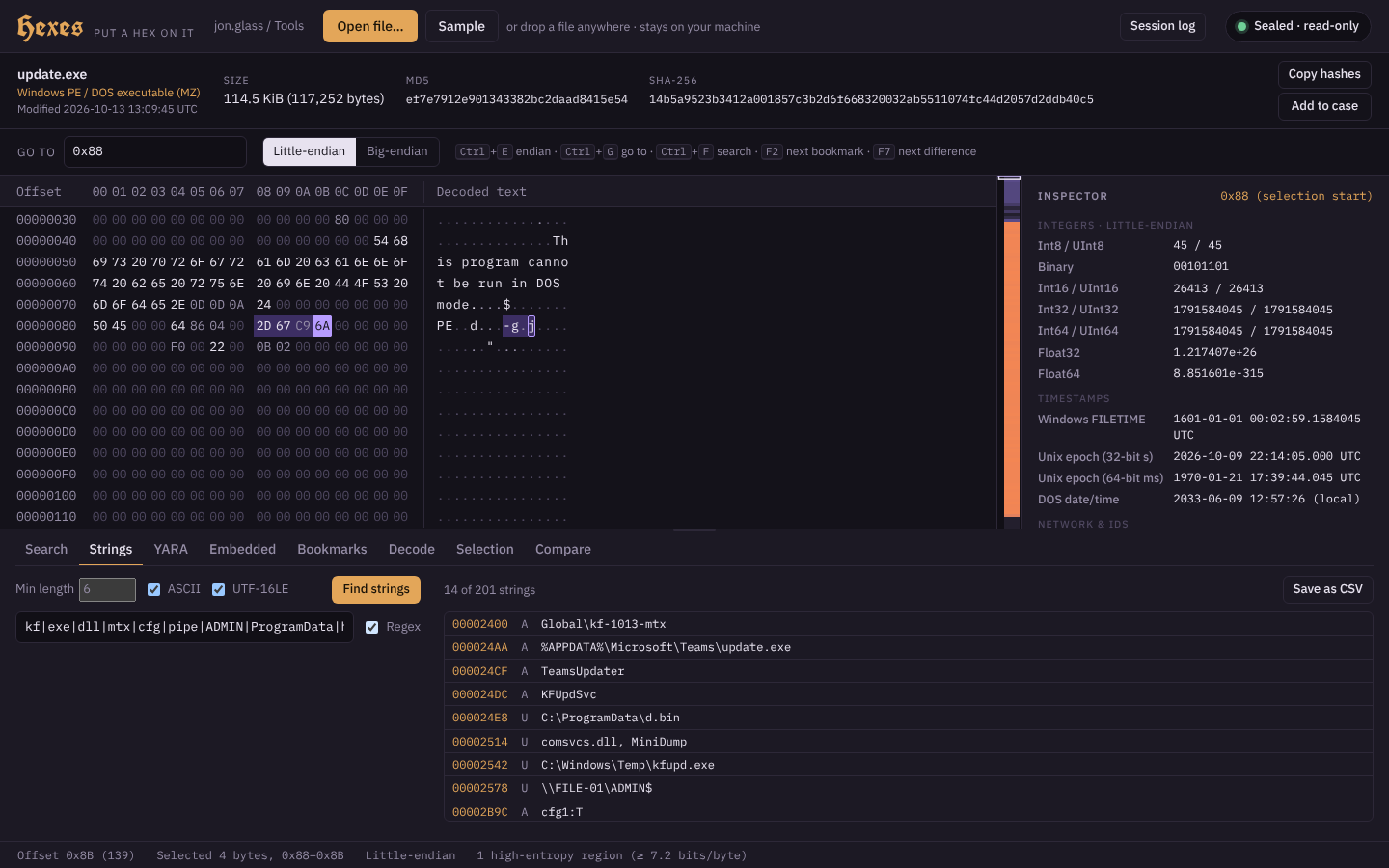 Fourteen of 201 strings, filtered to the interesting ones: a mutex, the persistence path, the task and service names, and UTF-16 strings for the LSASS dump path,
 comsvcs.dll, MiniDump and \\FILE-01\ADMIN$. The implant carries its operator’s playbook.
Decode
The Decode tab works on whatever you’ve selected: Base64, XOR with a key you give it, Hex text to bytes, and XOR brute force, which tries every single-byte key and ranks the results by how much they look like text.
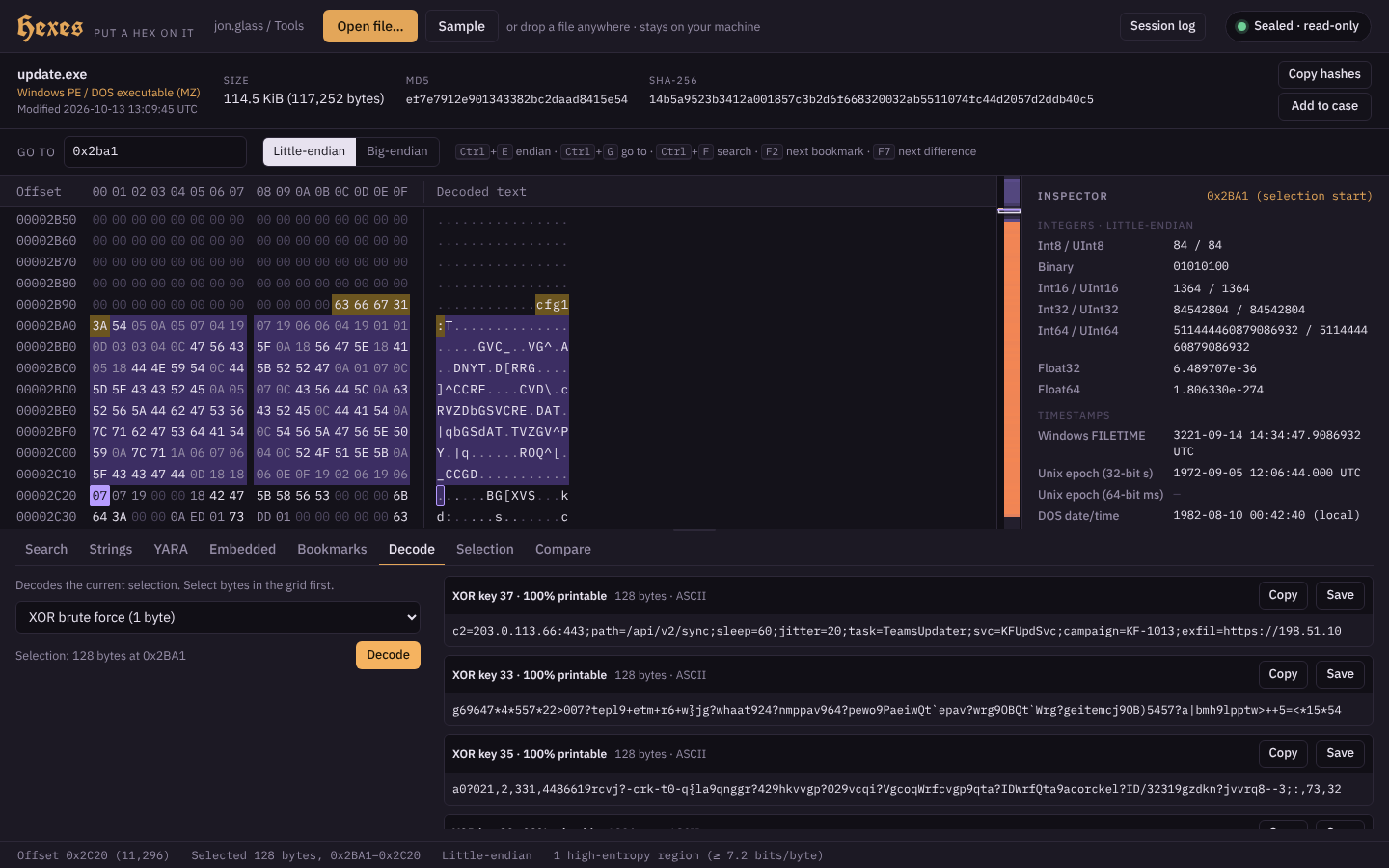 128 bytes after the text
 cfg1:. Key 0x37 comes out on top: c2=203.0.113.66:443;path=/api/v2/sync;sleep=60;jitter=20;task=TeamsUpdater;svc=KFUpdSvc;…
The ranking matters more than it sounds. Plenty of wrong keys turn text into other printable text, because flipping a low bit turns letters into letters, so “100% printable” ties between half a dozen keys. Hexes scores how much the result looks like ordinary text instead, so the right key comes first.
When CyberChef is the better tool, select the bytes and use Send to CyberChef in the Selection tab. The bytes travel as hex with a From Hex step already in the recipe, so they arrive exactly, binary and all, and they ride after the # in the link, so no server ever sees them.
Bookmarks
Bookmark the selection, or the byte under the cursor, with a note. Eight-byte FILETIMEs and Unix-millisecond times are recognized and decoded as you add them; four-byte values only get a suggestion, because almost any four bytes read as a plausible date (an IPv4 address does). Bookmarked bytes get a green underline in the grid, F2 jumps between them, and they come back when you reopen the same file, matched by its SHA-256.
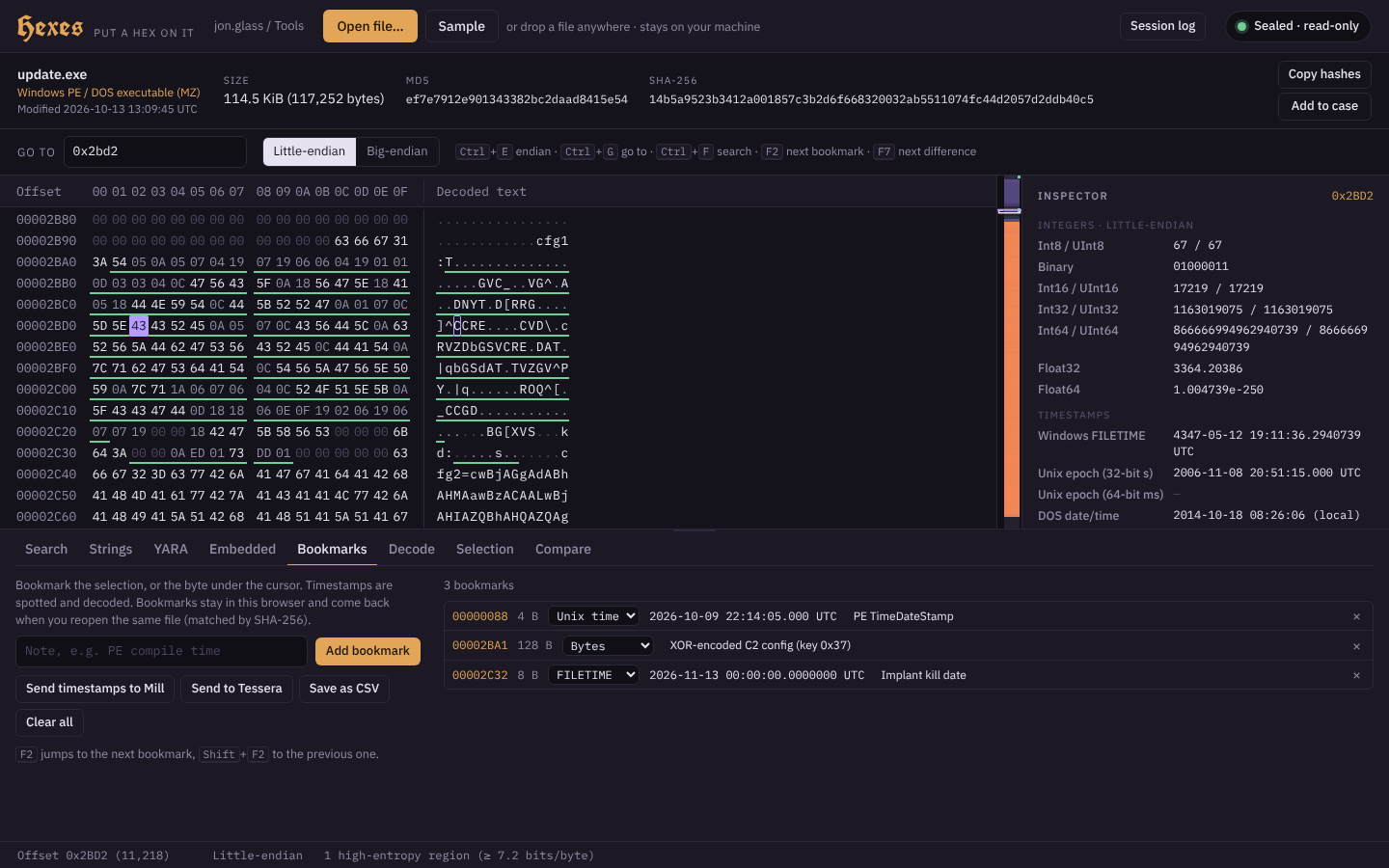 The build time, the XOR’d config, and a FILETIME after the text
 kd: that decodes to 2026-11-13: the implant’s kill date.
Send timestamps to Mill puts the dated ones on Mill’s timeline, and Send to Tessera adds the file and all your bookmarks to the case in Tessera.
Files Inside Files
The Embedded tab scans the whole file for file signatures at any offset, not just the start. Short signatures only count when the structure around them checks out: MZ needs a real PE header behind it, and the words FILE, PAGE and RIFF in ordinary text are rejected. Where it’s cheap to read, a hit says more: a PE’s architecture and build time, a ZIP member’s name, a PDF’s version.
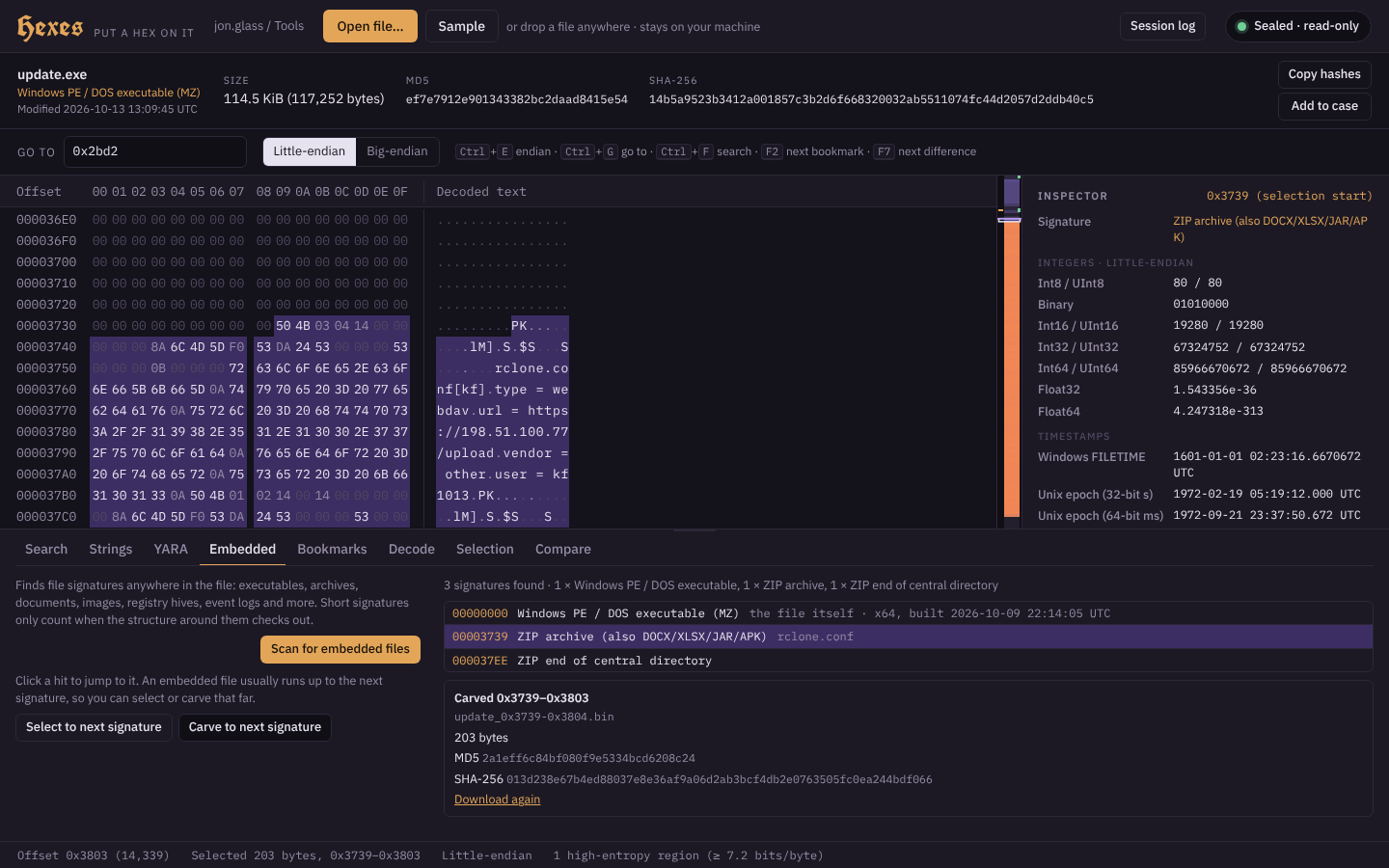 A ZIP archive at 0x3739 holding
 rclone.conf. Carve to next signature saved it, end record included, as a 203-byte archive that opens: the attacker’s exfiltration settings, packed before the intrusion began.
An embedded file usually runs up to the next signature, so Select to next signature and Carve to next signature do the right thing most of the time. Every carve is hashed and logged.
YARA
The YARA tab runs rules in your browser with YARA-X, VirusTotal’s rewrite of YARA, compiled to WebAssembly. The engine (about 2 MB) only downloads the first time you scan, and Hexes refuses to run it unless it matches a pinned SHA-256. Scan the whole file or just the selection; click a hit to select its bytes.
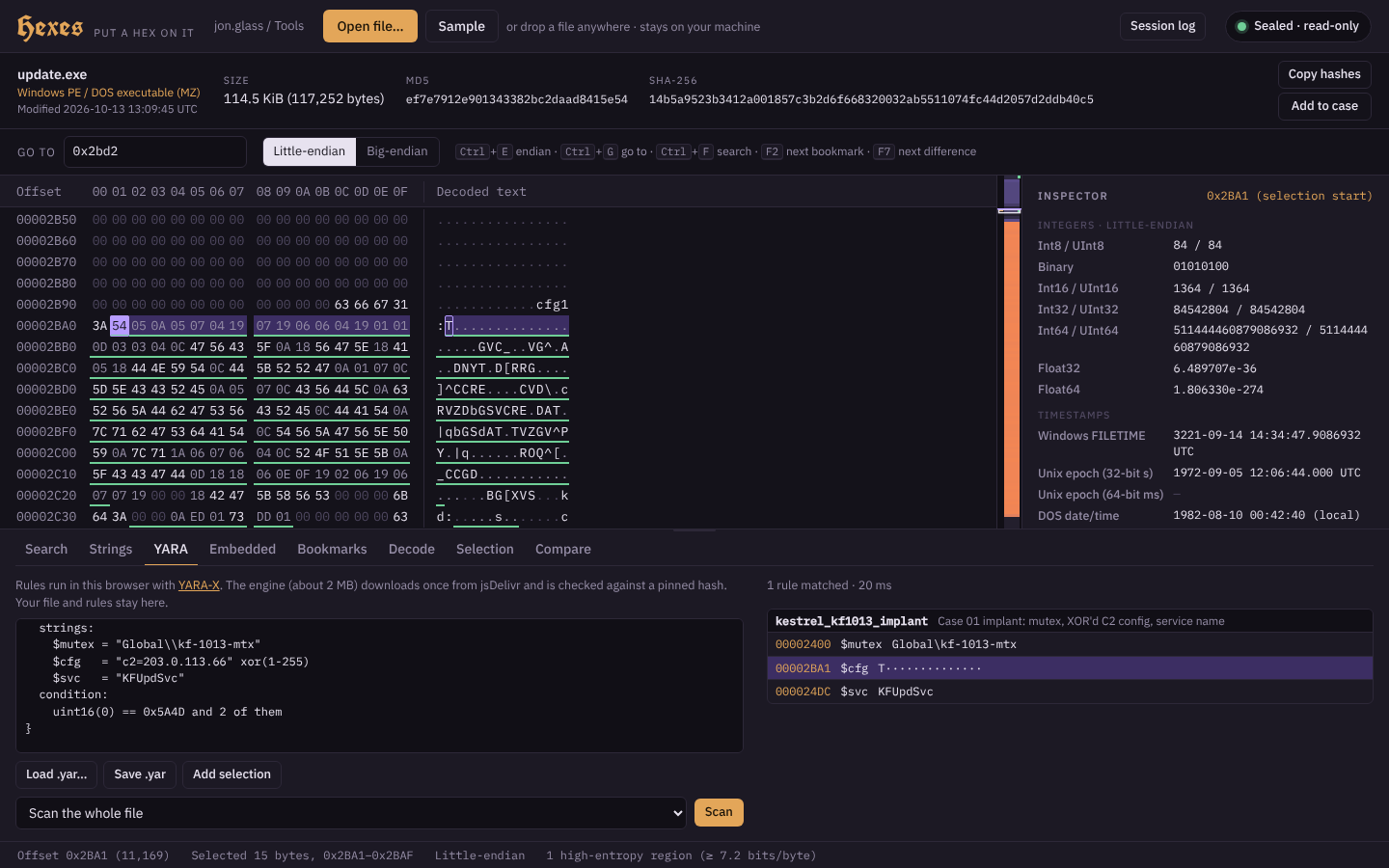 Three strings, three hits: the mutex, the service name, and the config found through the
 xor modifier at 0x2BA1, without knowing the key.
To write a rule from what you’ve found, select the bytes (or click a string in the Strings tab) and press Add selection. Hexes writes it as a text, wide or hex string in a rule of its own, from_hexes, so it never breaks the conditions of the rules you’ve written. Each scan goes into the session log with the rules’ SHA-256.
Compare
Open a second file as B and both scroll together, with every differing byte highlighted, a list of differing runs, and F7 to step through them. It answers “is this the same file?” and, when it isn’t, exactly which bytes changed.
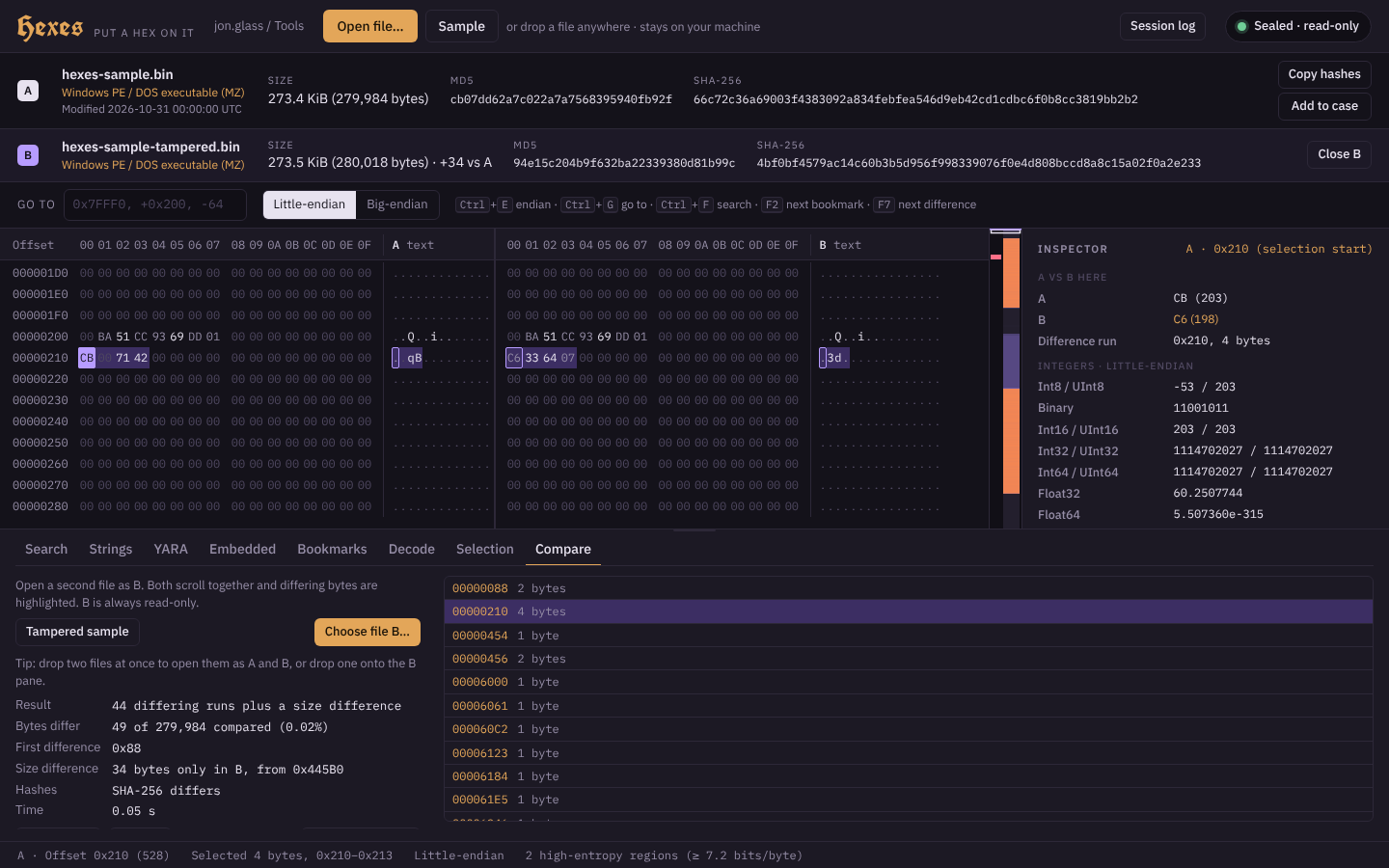 Hexes’ sample against a tampered copy: 49 bytes differ across 44 runs, plus 34 bytes appended. The first change is the PE build time; the selected one is an IP address, 203.0.113.66 in A and 198.51.100.7 in B.
The Session Log
Session log downloads a JSON Lines record of the session: every file opened and compared with its hashes, every carve, export and saved CSV with the hashes of what was written, every YARA scan with the hash of the rules, and every set of bytes sent to another tool. It’s not a substitute for your case notes, but it is the part of them you’d otherwise forget.
Try It
Open Case 01’s implant in Hexes. Search for cfg1:, select what follows and brute-force the XOR. Then open the Embedded tab and carve out the ZIP. Or click Sample for Hexes’ own practice file, which lists what’s hidden in it, and Tampered sample in Compare to find what changed.
If there’s a structure you keep decoding by hand, tell me and it might become a tab.