
Knowing When You've Actually Contained an Intrusion
The most dangerous sentence on an incident bridge is “we isolated the box.” It sounds like containment. Often it isn’t. The attacker moved off that host an hour ago, the service account they stole still works, and the implant has a second home on the file server. Pulling the first machine off the network feels like progress, and it gets reported up as containment, but the adversary is still very much inside.
So I built Scrimmage, a browser-based red-team-vs-blue-team simulator for pulling that distinction apart. You launch attacker moves on the left and defender responses on the right, both on one clock, and the tool works out whether the organization is actually contained rather than whether it feels contained. You can try it right now at jon.glass/scrimmage.
Goals
- Containment is computed, not declared. The attacker has to hold no live host, no command-and-control channel, and no persistence. Isolate one box while credentials and C2 stay live and the tool says partially contained, not done.
- Model the org as state, not two timelines. Every red action adds something the attacker holds; every blue action takes something away. Posture falls out of what’s left.
- Fog of war by default. Blue only acts on what its logging has actually detected, so quiet moves slip through and the defender’s picture drifts from the truth.
- Investigation has to matter. You can’t reset a credential you don’t know was stolen or revoke a cert you haven’t pulled from the sample.
- Keep it local. Like Spoke and Huddle, it’s a single static page. No server, no account, nothing uploaded.
The Board
Five hosts make up the estate: a couple of workstations, a file server, a domain controller and a backup server. The red bench on the left is grouped by ATT&CK tactic, from Initial Access down to Impact. The blue bench on the right follows the IR lifecycle, from Detect through Recover. Every action has a duration, so the shared clock shows the race between attacker dwell time and defender response.
The middle column is the organization’s real state: which hosts are compromised, and what the attacker is holding — stolen credentials, C2 channels, persistence. Containment is read straight off that. As long as a live host, a C2 channel or a persistence mechanism remains, you are not contained, however many boxes you’ve isolated.
Fog of War
This is the part that makes the point. Each red technique has a noise level and a detection threshold tied to how much logging you’re running. Noisy moves like phishing and credential dumping get caught at medium logging. Quiet, valid-credential moves — lateral movement, the pivot to the domain controller — look like normal logons and slip right past. So blue’s view of the incident drifts away from the truth, and the Posture panel shows both at once.
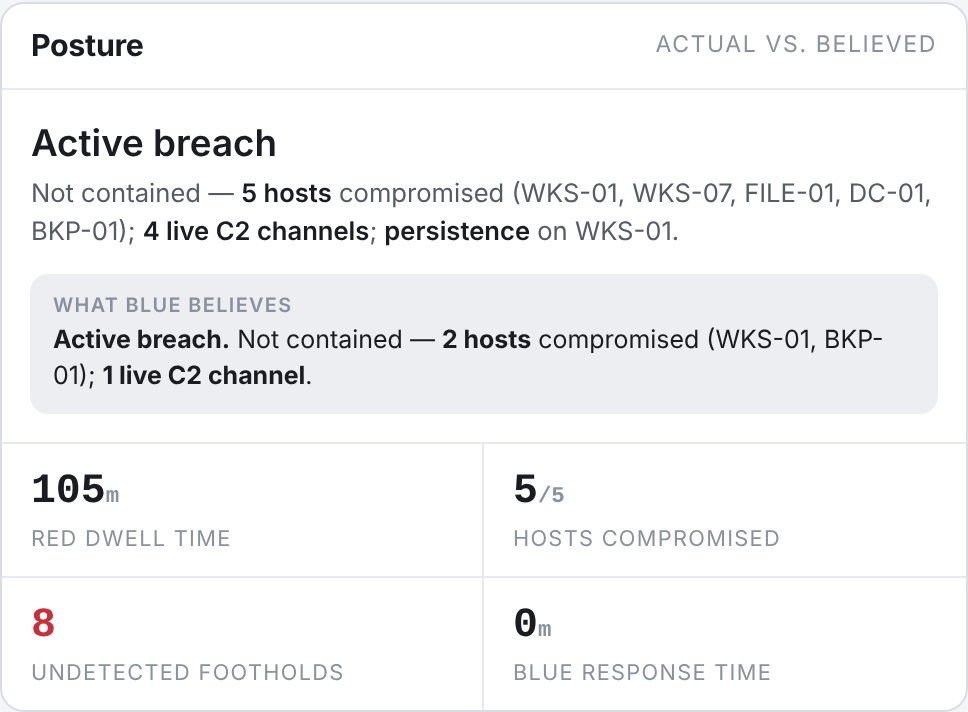 Ground truth up top: five hosts compromised. What blue believes, from its telemetry alone: two. The eight undetected footholds are the gap between the incident you’re running and the incident you’re seeing.
Now the lesson lands on its own. Tell blue to isolate every host it currently knows about and the posture still reads not contained, because the file server and the domain controller it never detected are still live. You didn’t fail to act — you acted on a map with holes in it.
Investigate Before You Eradicate
The way out of the fog is investigation, and Scrimmage makes you pay for it in the order real IR does. A threat hunt sweeps the network and reveals which hosts are actually compromised. Malware analysis reverses the implant for its indicators, exposing the C2 infrastructure and the persistence mechanism — and only then can you revoke the signing cert that kills it. Host forensics reconstructs the attack path and surfaces which credentials actually walked.
Skip a layer and you leave a blind spot that quietly defeats eradication. Reset credentials without doing the forensics and the stolen domain-admin account you never detected walks right back in. Isolate everything but skip the malware analysis and the signed implant just re-establishes itself. Flip on Reveal ground truth and the estate shows you everything logging missed.
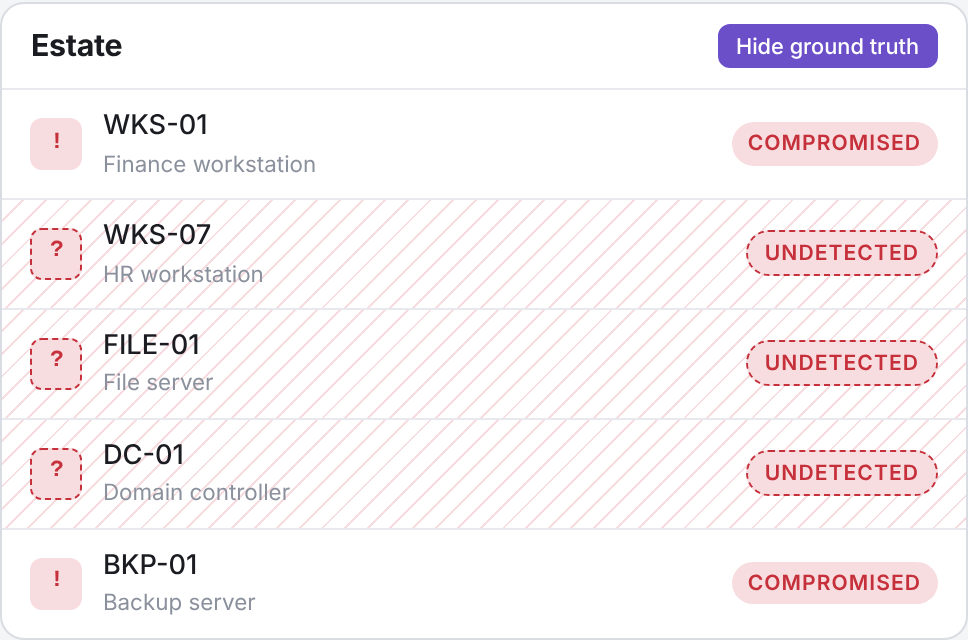 Reveal ground truth and the hosts blue never detected show up hatched in red — compromised, and invisible to the defender until a hunt or forensics turns them up.
Those investigation steps are slow on purpose — forensics runs ninety minutes on the clock — so you feel the dwell time that honest eradication actually costs.
The Debrief
When the dust settles, the after-action panel tells you whether you won: time to containment, how long it took blue to respond, how many hosts fell, and whether the attacker reached Impact.
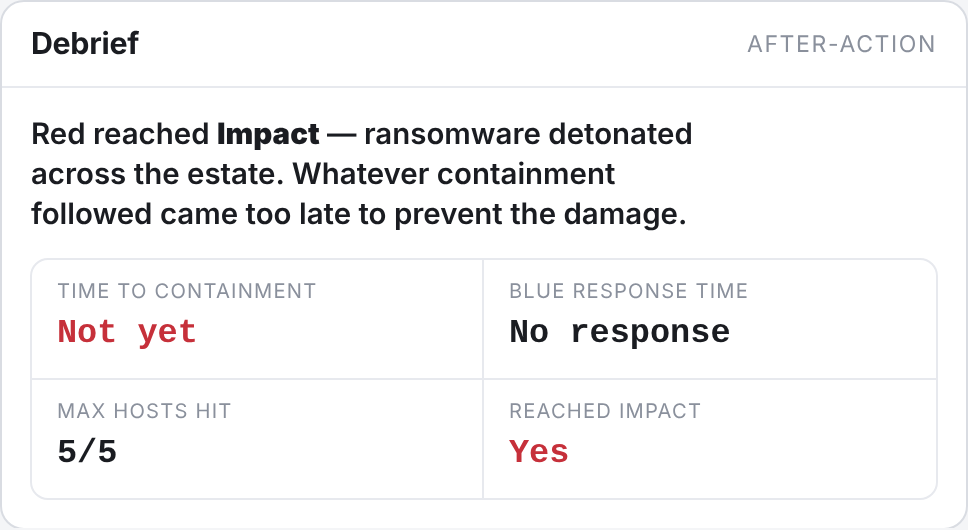 The debrief after a full ransomware run. The cleanup eventually worked, but the verdict is blunt about it: red reached Impact before anyone acted.
Run the full ransomware chain and even a flawless blue response reads as a loss, because the ransomware already detonated before the first containment action landed. That’s the whole argument in one panel: a tidy after-action timeline doesn’t mean you were fast enough.
Four Ways to Play
Underneath, both sides run on the same engine, so the “mode” is just which side you script. Drive both by hand for a free-form sandbox. Inject a red recipe and respond to a known attack against the clock. Inject a blue recipe — a playbook — and red-team it to find where it breaks. Or run a recipe against a recipe and answer the question that actually matters: does our ransomware playbook contain this attack, or just look like it does? The “Hunt-led containment” playbook raises logging, hunts, analyzes and does forensics before it contains; the “Isolate initial host” one doesn’t, and the difference shows up in the posture.
Try It
Open Scrimmage, click Ransomware intrusion, and watch the chain roll across the estate at medium logging. Then try to shut it down. Isolate the box you can see and watch the tool insist you’re not finished. Raise your logging, hunt, analyze, and see how far the attacker got while you were still building a picture.
The hosts, durations and detection thresholds are illustrative — tune them to your environment before you lean on any of this in a real tabletop. If you build a scenario you think others would learn from, let me know.