
A PE Viewer That Expects to Be Lied To
Every Windows executable starts by making claims about itself. The headers say what it was built with and when, where its code is, which DLLs it needs, whether it’s signed, and where it starts running. Most of the time those claims are true. When they aren’t, that’s usually the most interesting thing about the file.
The classic tools for reading those claims are PE-bear and CFF Explorer. PE-bear is excellent and still maintained; CFF Explorer hasn’t changed in over a decade. Both are Windows programs you have to install, which is a problem on a locked-down analysis box, a jump host, or a Mac. And both show you the structure without telling you which parts of it should worry you.
So I built Peek, a PE header viewer that runs in your browser. Drop in an EXE, DLL or driver and it reads every header, hashes the file, and lists what looks off. You can try it right now at jon.glass/peek.
Goals
- Never run it. Peek only reads. Nothing is executed, rendered or followed, and nothing is uploaded.
- Hashes first. SHA-256, SHA-1, MD5, imphash and the Rich header hash are at the top with copy buttons, because those are what go into the ticket and the search bar.
- Findings, not verdicts. Every observation gets a severity and an explanation. Plenty of legitimate software trips the checks, and plenty of malware trips none.
- Survive hostile files. Malware breaks its own headers on purpose. A viewer that crashes on a bad section count is useless when you need it most.
- Keep it local. Like the rest of the suite, it’s a static page. There’s also a single offline file for machines that can’t reach the site.
- Work with the other tools. Send the file’s bytes to Hexes and its hashes and findings to Tessera.
Open It
The first screen answers “what is this?” before you scroll: what kind of image it is, who signed it, what built it, where it starts, and the hashes.
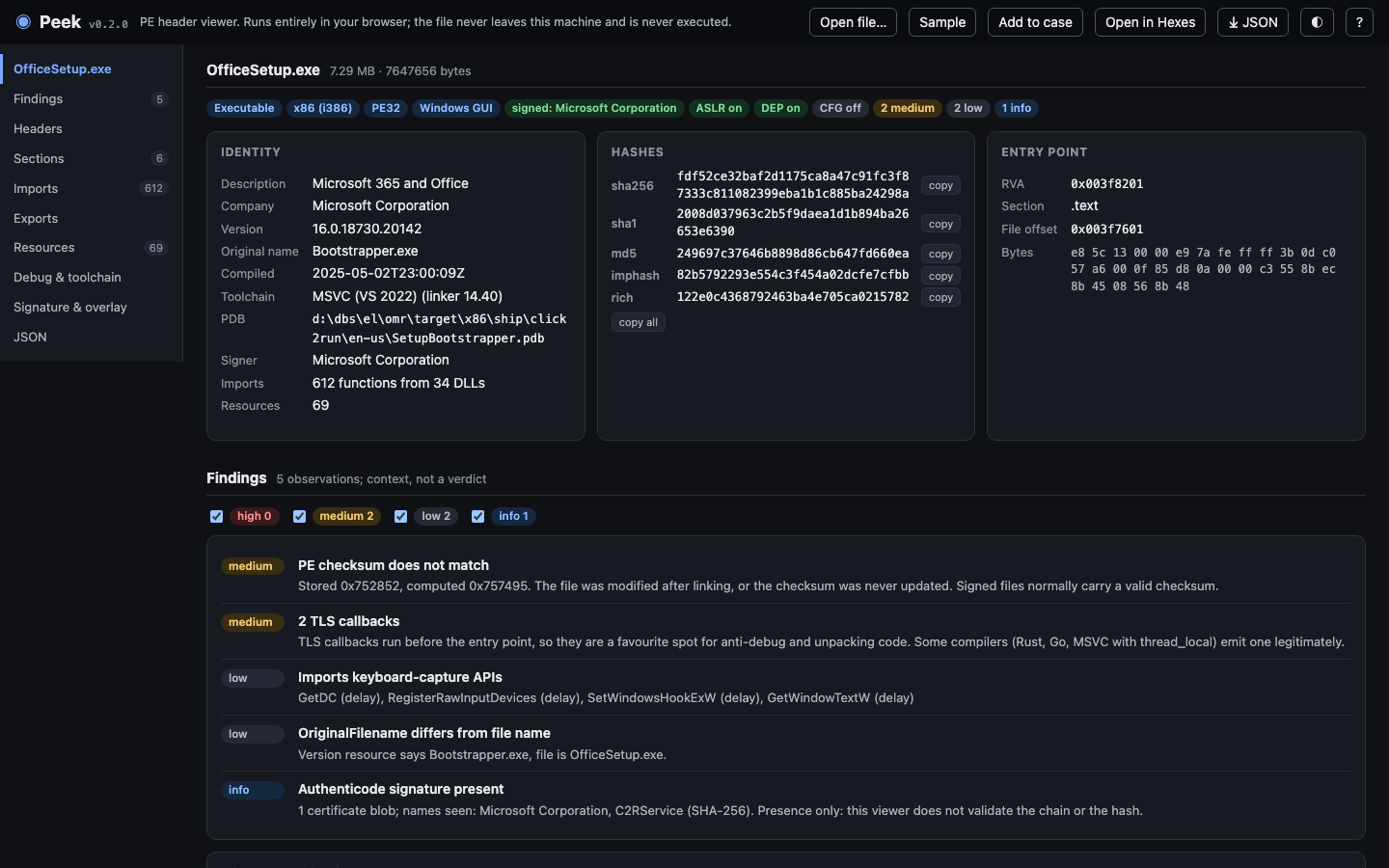 Microsoft’s Office installer. The version info and the signature both say Microsoft, the Rich header says it was built with Visual Studio 2022, and the entry point is in
.text where it belongs.
The imphash hashes the list of imported functions, so builds of the same malware family often share one even when every other byte differs. The Rich hash does the same for the undocumented header the Microsoft linker leaves behind, which records each compiler and tool that touched the build. Both are searchable in VirusTotal and recorded by most sandboxes.
Getting the imphash right turned out to be subtler than it looks. Some DLLs, notably Winsock, are usually imported by number rather than by name, and pefile (the Python library behind most imphash values you’ll find online) translates those numbers back to names before hashing. My first, hand-typed Winsock table was wrong from ordinal 24 onward, which would have produced an imphash that matched nothing, silently. Peek’s tables are now generated from pefile’s own, and the tests check its imphash and Rich hash against pefile on real binaries.
Findings, Not Verdicts
Below the summary, Peek lists what it noticed, most severe first, and groups the imports by what they let a program do.
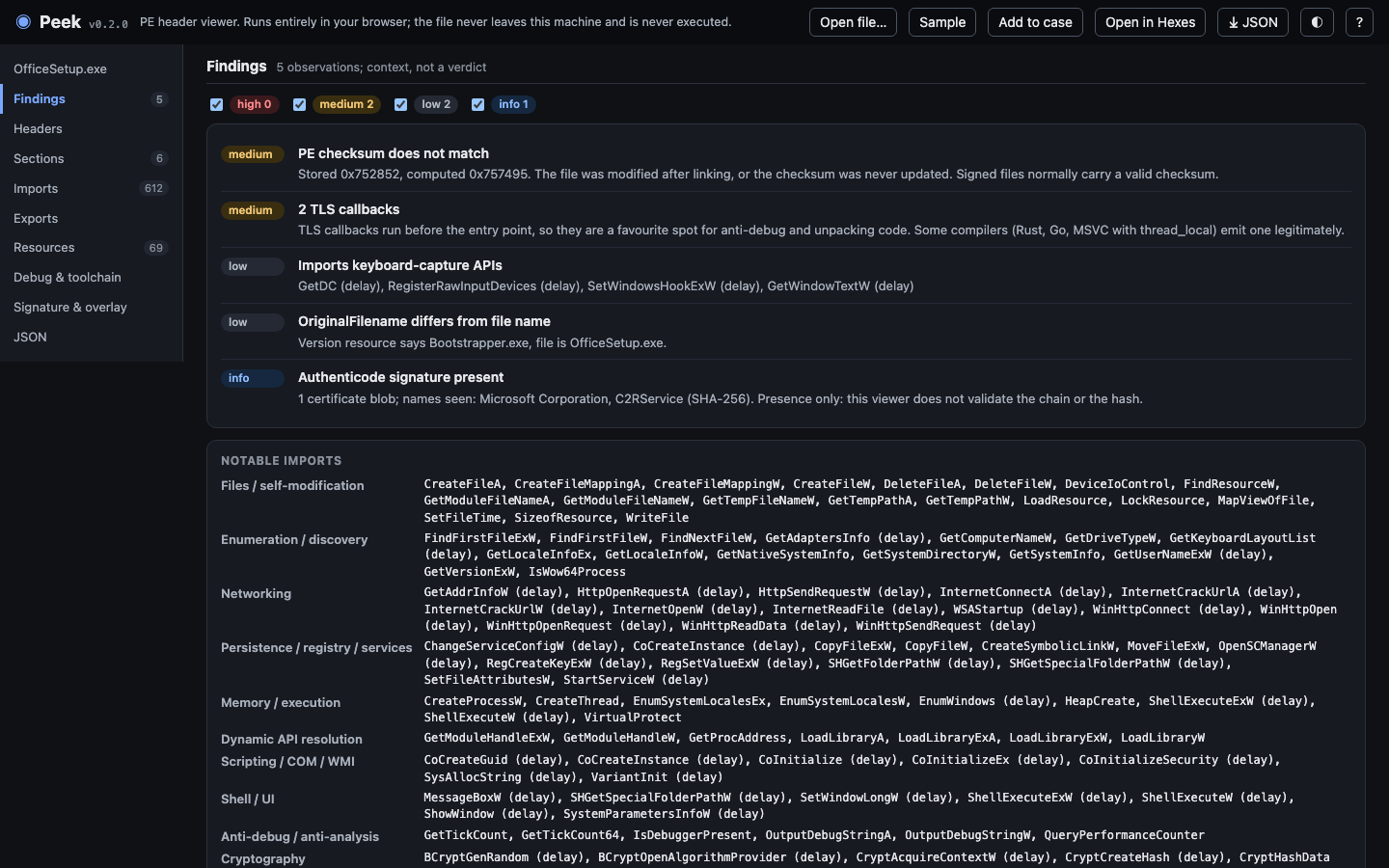 Five findings on a genuine, signed Microsoft installer: a checksum that doesn’t match, two TLS callbacks, and keyboard-capture APIs. All of them are normal for an installer this size.
I picked this file on purpose. TLS callbacks run before the entry point, which makes them a favourite hiding place for anti-debugging code, and they’re also something compilers emit for perfectly ordinary reasons. SetWindowsHookEx is how keyloggers work, and also how a setup wizard handles its own windows. A finding tells you where to look next, not what you’ll find there.
The checks cover the usual suspects: packer section names, sections that are both writable and executable, entry points outside the code (or outside every section), high-entropy sections and resources, executables hidden in resources or appended to the end, compile times that are zero or in the future or later than the signature, a tiny import table that’s just LoadLibrary and GetProcAddress, process-injection API sets, and suspicious words in the PDB path.
Debug and Toolchain
The PDB path and the Rich header are often the most revealing parts of a binary, because few authors think to clean them up.
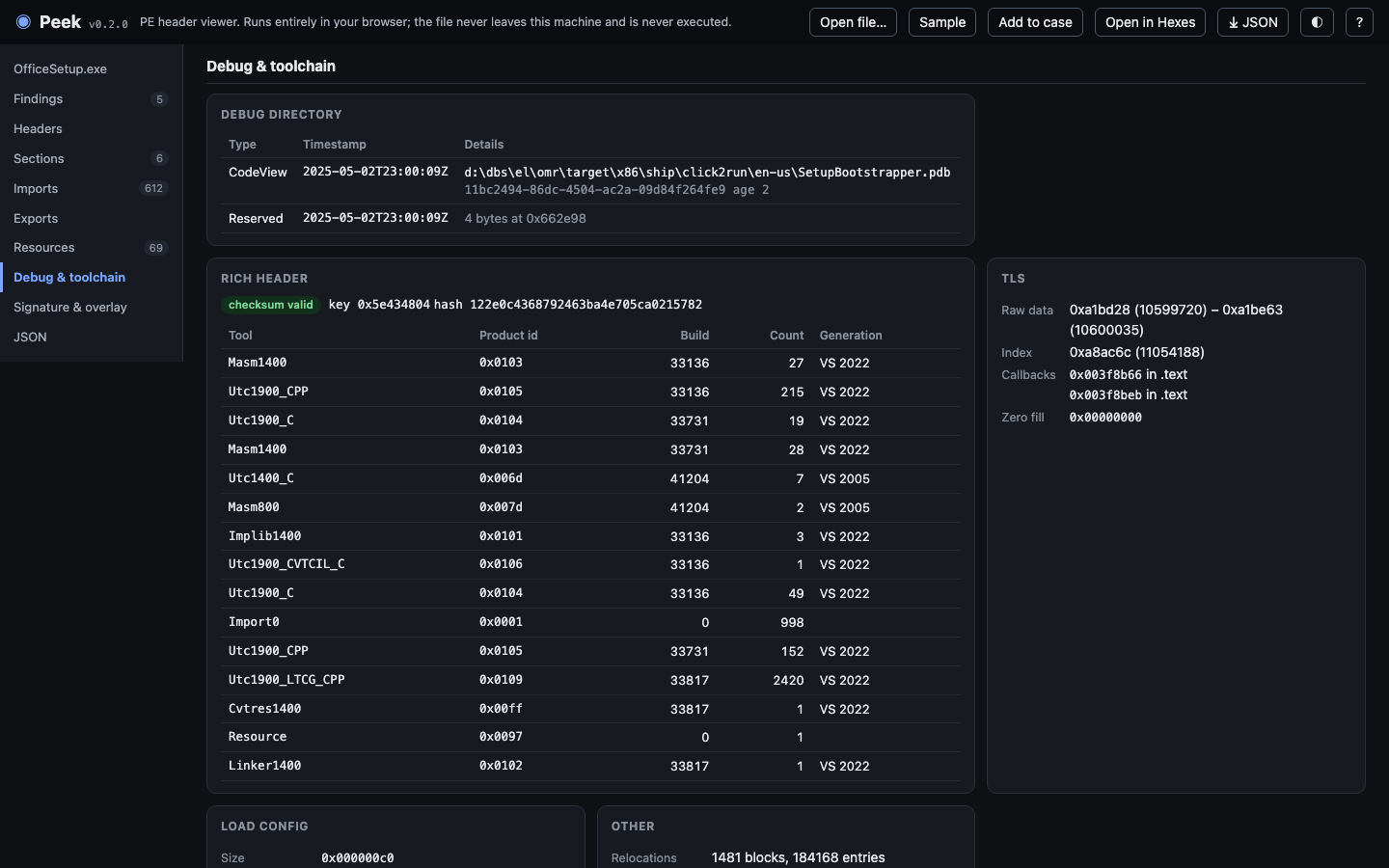 The debug directory holds the build machine’s path and the PDB’s GUID. The Rich header’s checksum is valid, so it hasn’t been naively edited, and it lists every tool in the build: mostly VS 2022, plus two objects from a 2005-era compiler, most likely an older library linked in.
The Rich header has two numbering schemes, one for linker-family tools and one for compilers, and Visual Studio 2015 to 2022 all share the same version number. Peek uses the build number to tell them apart, so you get “VS 2022” rather than “VS 2015-2022”. A Rich header whose checksum doesn’t match has been edited, which is worth knowing when someone is trying to make their malware look like someone else’s.
Case 01’s Implant
In Case 01, the attacker drops an update.exe on a finance workstation. The Hexes post pulled its strings, XOR’d config and kill date out of the raw bytes. Peek asks a different question: could this file actually run?
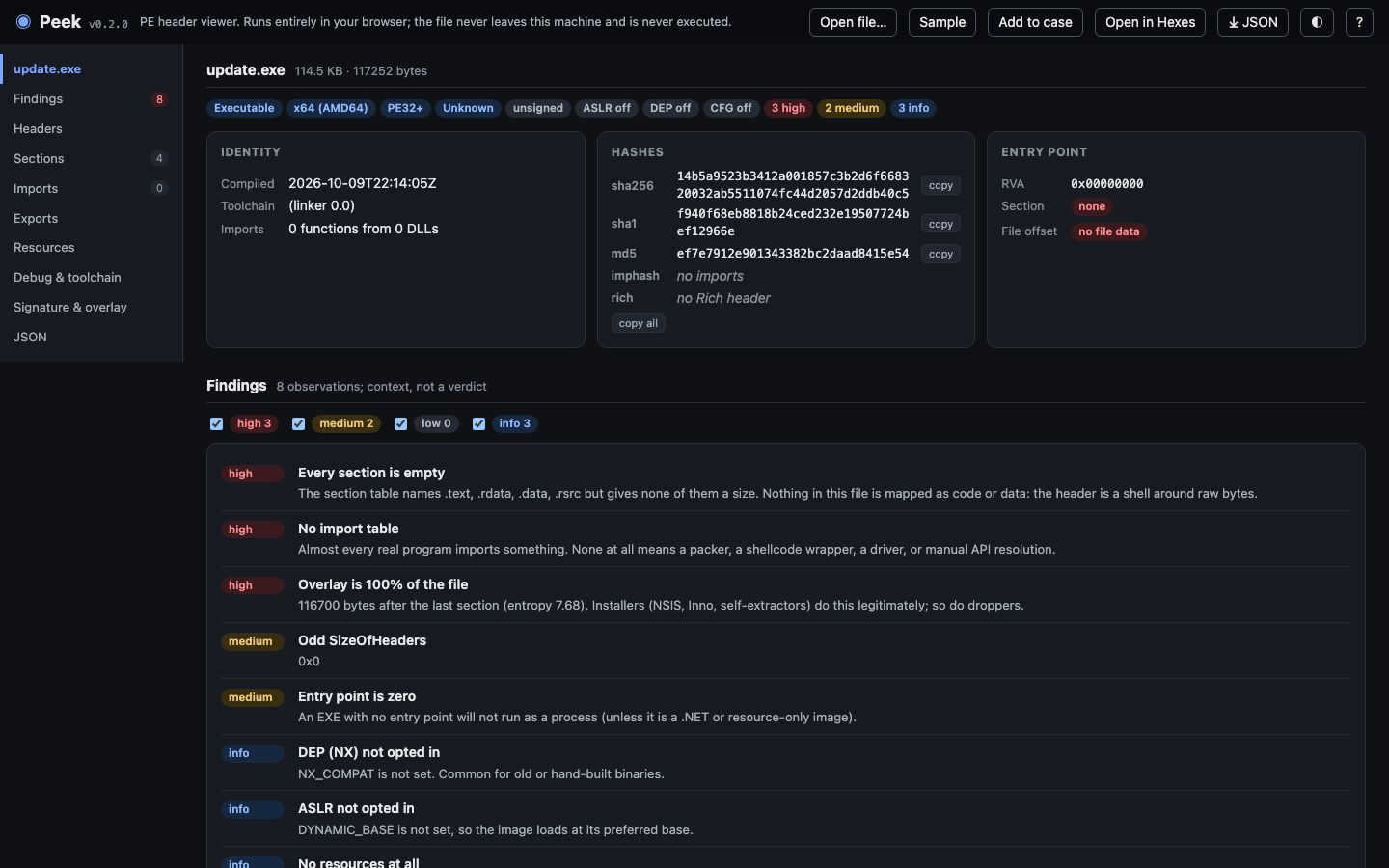 The build time matches what Hexes read: 2026-10-09 22:14:05 UTC, four days before the phishing email. Everything else is wrong. The section table names four sections and gives none of them a size, nothing is imported, the entry point is zero, and all 116,700 bytes after the header are data the loader would never map.
The honest answer is that Case 01’s implant is a prop: it’s generated for the course, and it says “Fake and safe: this is not a program” in its own bytes. But the shape Peek reports is a real one. A PE header stapled onto high-entropy data is what a dropper’s container or a corrupted carve looks like, and either way it means the thing that ran on the workstation is somewhere else.
Add to case sends the file to Tessera as an evidence item with its hashes and a one-line summary, the hashes as indicators, and the high and medium findings with a confidence: likely for high, possible for medium. Open in Hexes sends the bytes across, positioned at the entry point.
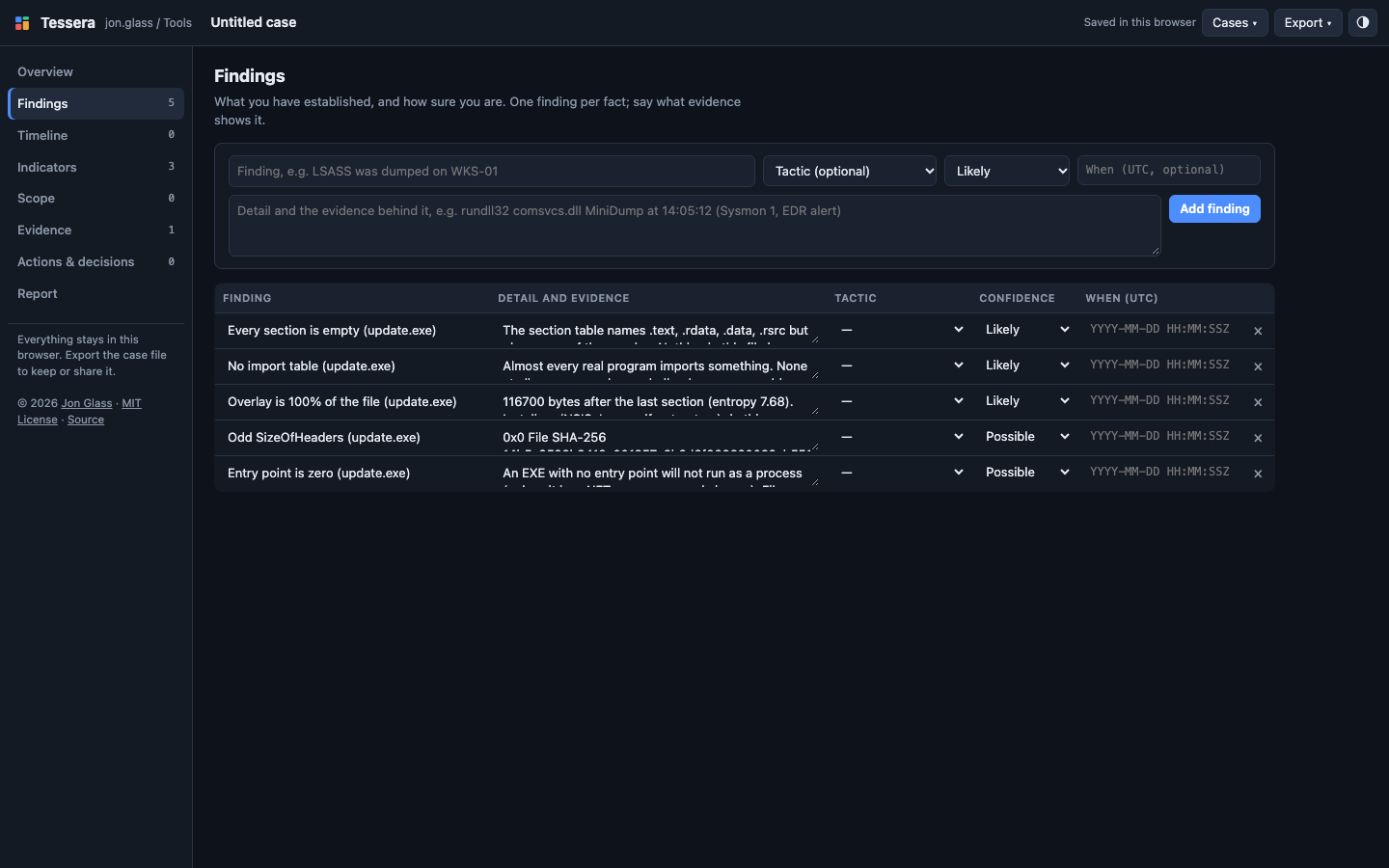 The implant’s findings in Tessera, each with the file’s SHA-256 in its detail. Sending the same file twice adds nothing new.
Built to Be Lied To
Malware authors and tool writers have spent decades finding PE headers that Windows will load but analysis tools choke on. Ange Albertini’s corkami collection is the standard set of them, and Peek’s tests run all 219 of its proofs of concept under 64 KB.
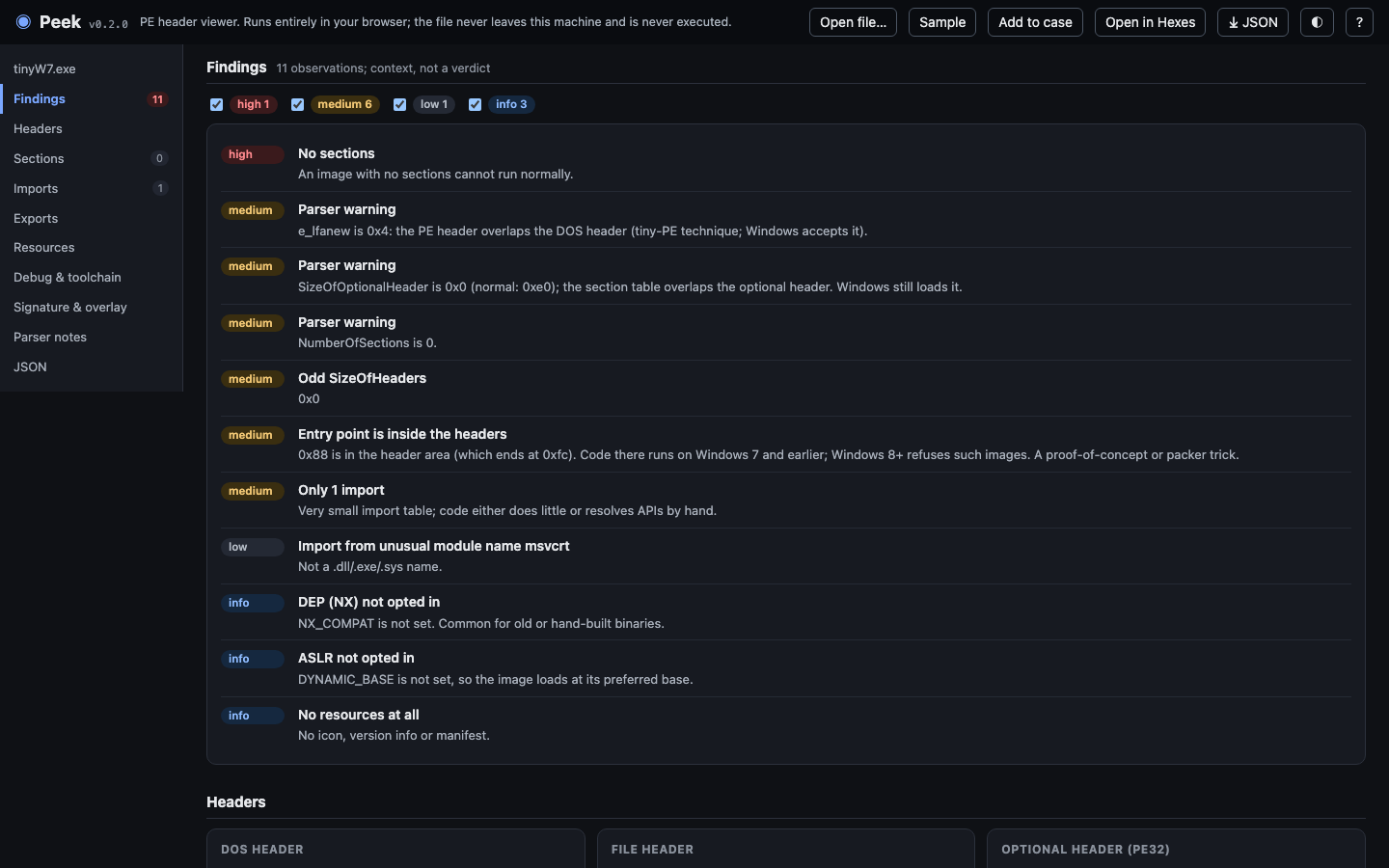
tinyW7.exe: 252 bytes, with the PE header overlapping the DOS header, no optional header size, no sections, and code inside the headers. Windows 7 runs it. Peek reads it and says exactly that.
The first run didn’t crash on any of them, but it did reject files Windows happily loads, which is just as bad for triage. Peek now accepts the header inside the DOS header, a zero optional header size, the old ZM signature, and a 61-byte PE that ends halfway through its own optional header, and it flags each one. The only corkami files it rejects are a DOS program and a 16-bit Windows 3.x executable, neither of which is a PE at all. Taking the screenshot above also turned up one more bug: Peek was reporting most of those tiny files as “data appended to the end”, when Windows maps them whole. That’s fixed too.
The tests also include a fuzzer that takes real executables and breaks them the way malware does: flipped bits, truncation, absurd counts, pointers to nowhere. Its first run found crashes, and an import table that sent the parser through 8.7 seconds of garbage on a 100 KB file. Thousands of mutated files later, it finds nothing.
What It Doesn’t Do
Peek shows whether a file carries an Authenticode signature and whose names are in it. It doesn’t check that the signature is valid or that the file still matches it; use signtool verify or Get-AuthenticodeSignature for that. It doesn’t disassemble, and it only reads the wrapper around .NET assemblies, not the managed code inside. For that, open the file in a decompiler.
Try It
Open Case 01’s implant in Peek and compare its findings with what Hexes found in the bytes. Or click Sample for a small, ordinary Windows launcher, and then drop in something from your own Downloads folder: installers are a good way to learn which findings are normal.
The source is on GitHub, along with a command line version that uses the same parser for hashing a folder of samples.
If a header trick gets past it, send me the file’s hash and it’ll go into the tests.