
Painting Every Page With Your Own Patterns
Prism colors text you paste into it. The question I got most after that post was some version of “can it do that in the console I already have open?” The ticket queue, the EDR alert page, the chat where someone just dropped a command line. Copying text out of the tool you’re in and into another one is exactly the step where you lose the context around it.
So I built Prism CDP: a small Python script that starts Edge or Chrome and puts Prism’s highlighting on every page you open in that window. It uses the same engine, the same hover card and the same kind of rules, and the rules come from a CSV file you keep wherever you like.
Goals
- Every page, no copy and paste. Open the console you work in and the matches are already colored.
- Nothing installed in the browser. No extension, no store listing, no “read and change all your data on all websites” prompt. The script talks to the browser over the Chrome DevTools Protocol, the same channel the browser’s own developer tools use.
- Invisible to the page. The page’s scripts shouldn’t be able to see the highlighter, and the highlighter shouldn’t change a single character of the page.
- Signatures in a file you own. A spreadsheet of patterns is easier to keep, share and review than rules buried in a tool’s settings.
- Leave nothing behind. When you quit, every page goes back to exactly how it was.
- Nothing to install. Python 3.9 or newer with the standard library only, on macOS, Windows and Linux.
Run It
git clone https://github.com/glassdfir/prism-cdp
cd prism-cdp
python3 prism_cdp.py --starter
A new browser window opens with its own profile, kept in ~/.prism-cdp/. Your everyday window stays open alongside it and is never touched. The first time, sign in to the consoles you need in the new window; the sign-ins are kept for next time. Prism CDP uses Edge if it’s installed, and Chrome if it isn’t, or --chrome picks Chrome. On Windows, run it with py instead of python3.
--starter loads the same starter DFIR rules as Prism: suspicious tooling and PowerShell flags, URLs, IPv4 and email addresses, domains, hashes, Windows paths, registry keys and timestamps. Open any page in that window and they’re already working.
How It Gets Into the Page
The script attaches to every tab, and to every cross-origin frame inside one, as they appear. A new tab is held for a moment until the highlighter is registered in it, so nothing loads unpainted. The highlighter itself runs in an isolated world, the same kind of separate JavaScript context a browser extension’s content scripts use. The page shares the DOM with it but can’t see its variables, its code or its rules.
Inside the page, it uses the CSS Custom Highlight API, like the Prism page does. Matches are painted from ranges over the text that’s already there, so no <span>s are wrapped around anything, and the page’s own scripts and frameworks never see their text change. The hover card and the small Prism control in the corner live in closed shadow roots. Their styles are constructed stylesheets, which a page’s Content Security Policy doesn’t block. I learned that one when my first strict-CSP test page showed a perfectly working, completely unstyled hover card.
Type quit and the script stops the highlighter in every frame, removes its highlights, styles and elements, and lets go of every tab. If Prism CDP started the browser, it closes it too.
Signatures in a CSV
The rules file is a CSV with a header row and one signature per row. Here’s part of the one I used on Case 01 (the whole thing is examples/case01.csv in the repo):
# Case 01: signatures for working the case
name,pattern,flags,color,style,on,desc,severity,ticket
Isolated laptop,\bWKS-01\b,,#ef5b5b,fill,yes,Virginia Penn's finance laptop. Isolated by the SOC at 16:05.,high,IR-1013
Case hosts,"\b(?:WKS|FILE|DC|MAIL)-\d{2}\b",,#22d3ee,underline,yes,Machines in scope for Case 01,,IR-1013
Encoded PowerShell,(?<![\w-])-(?:enc(?:odedcommand)?|nop|w hidden)\b,i,#ec4899,fill,yes,Decode before you trust it.,medium,
Patterns are written exactly as you’d type them into a regex tester. The JSON alternative would double every backslash, and with a \b in nearly every pattern, one missed backslash quietly breaks a rule. Only pattern is required. Any column Prism doesn’t know, like severity or ticket here, shows up on the hover card, so the context you keep about a signature travels with it.
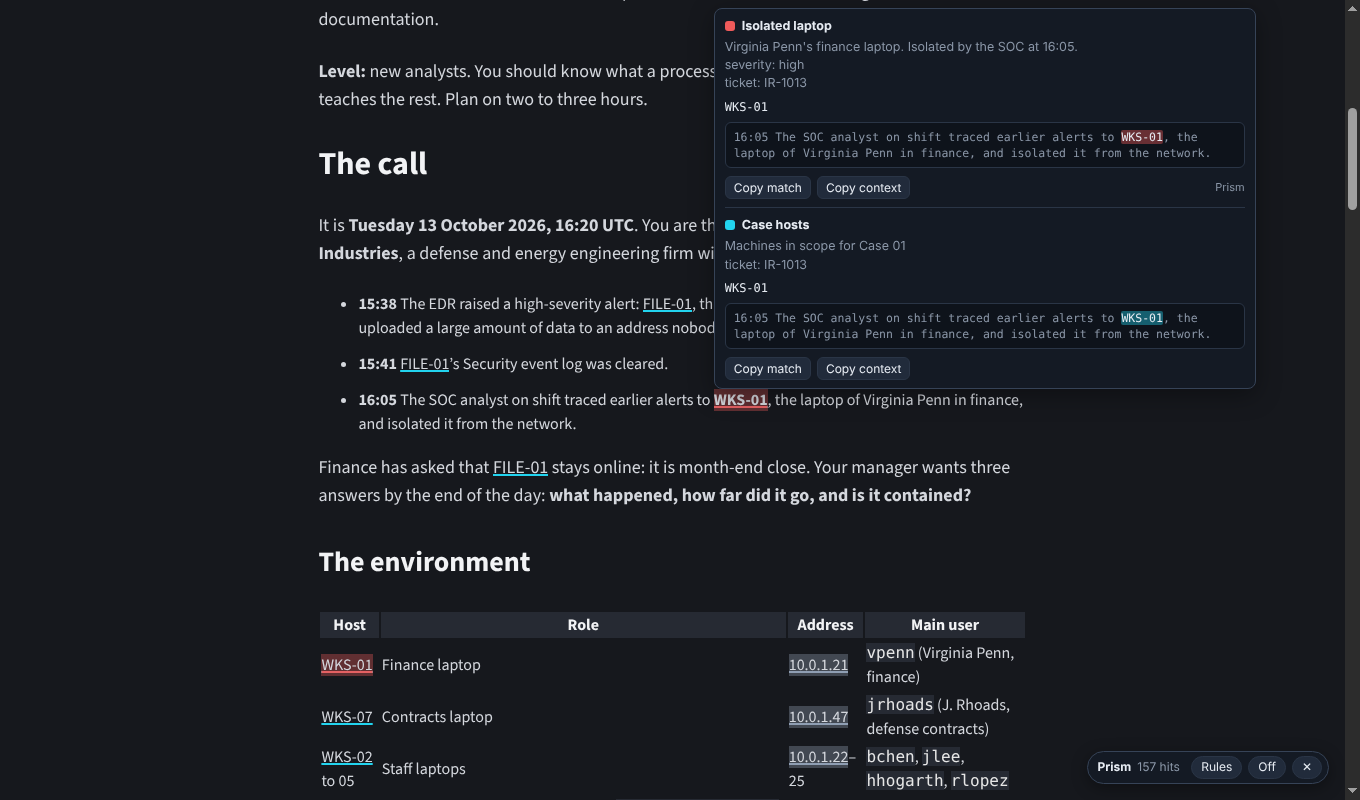 Case 01’s briefing with
examples/case01.csv. WKS-01 matches two rules, so the hover shows both, each with the severity and ticket from its row. The host table below picks up the hosts and internal addresses.
Save the file and every open tab picks up the change within a second. Regex counts like {1,3} contain a comma, which is the classic way to break a CSV; if you forget to quote one, Prism CDP puts the pattern back together and tells you which line it fixed. A blank on runs the rule and no keeps it in the file but skips it. Excel’s byte-order mark is fine, and .prism.json files and rule links from Prism work too.
Pipe or Port
On macOS and Linux, Prism CDP talks to the browser over a private pipe. No network port is opened at all, so nothing else on the machine can use that connection.
Sometimes you want other tools in, though: a Playwright script, a scraper, your own automation. --port opens the browser’s debugging port on 127.0.0.1:61455 (yes, it spells GLASS), and --attach connects to a browser that’s already listening there. With --keep-open, quitting removes Prism but leaves the browser running for the next thing.
Take that port seriously. Any program running as you can connect to it and fully drive that browser, including every site you’re signed in to in its profile. That’s why it’s off unless you ask for it on macOS and Linux. On Windows, Python can’t hand the browser a pipe, so Prism CDP always uses the port there, and the advice is the same: quit when you’re done, and keep the sign-ins in that profile to the consoles you work in. Recent Chrome and Edge versions also refuse remote debugging on your everyday profile, which is the other reason Prism CDP always runs its own.
While It Runs
The terminal takes a few commands. status lists each tab with its hit count, and any rule that isn’t running along with the reason. on and off work everywhere at once. rules <file> switches rule files, starter goes back to the starter set, open <url> opens a tab, and quit cleans up. Each tab also gets the Prism control in its corner, for loading different rules into just that tab or turning it off there.
Runaway patterns get the same protection as in Prism: each one is test-run in a background worker before it touches a page. Where a site’s security policy blocks that worker, a simpler check pauses patterns with nested repetition like (a+)+, and status tells you which rules it paused.
What It Doesn’t Do
It doesn’t look inside the shadow roots of a page’s own web components, so text that lives there isn’t highlighted. A match can’t span differently formatted text, like a hash that’s half bold. And it isn’t stealthy: some sites’ bot checks can tell a DevTools connection is attached, and Prism CDP doesn’t try to hide it. It’s a tool for your own work in your own consoles, not for anything that would object to a debugger.
Try It
The source is on GitHub, and the signatures file from the screenshot is in examples/case01.csv:
python3 prism_cdp.py --rules examples/case01.csv https://jon.glass/cases/arclight/
Then point it at the console you actually work in. If you build a signatures file you’re proud of, send it my way.